I helped someone switch carriers from Cingular to AT&T Wireless this week and I have to say it went fairly smoothly.
She ordered her new phone and GSM service from the AT&T Wireless business web site on Wednesday, had the phone and SIM on Friday, and had her number successfully moved, her new phone activated, and her old account closed by the following Monday. Five days turnaround time, without us having to do anything but place the order and with no interruption to service to her phone number (AT&T built in a grace period before they automatically closed her old account and activated the new one at the same time, so she was able to cut over immediately to the new SIM).
Not bad at all, actually. Maybe I should re-think my previous post.
Anybody else have experience with number portability working well, or not so well? Comment here.

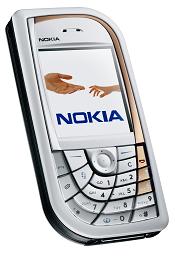
I recently purchased a Nokia 7610 and went through the process of moving all my most important mobile bits over from my old smartphone to it. Inspired by Russ’ “What’s on my Nokia 6600” blog entry, I thought I’d compile and publish an entry on all the software I’m using on my 7610 in addition to other useful information such as user guides, development info, etc. So here goes…
During the “Should I buy a 7610?” investigation phase, you’re going to want to read up on the device and its capabilities. The best resources I’ve found for this are:
- A list of the 7610’s key features and consumer specifications from Nokia.com
- The Nokia 7610 EasyGuide, an English language online version of the user guide that comes in the box with the phone (the user guide is also available as a PDF in 30 different languages by clicking here)
- For the developers among us: Be sure you read through Forum Nokia’s 7610 device page for developer oriented specs, Nokia’s Series 60 Developer Platform pages for development tools and information for Series 60, and the Symbian OS 7.0s Functional Description for details on the 7610’s underlying OS features
Once you’ve decided to buy a 7610 and have it in hand, you’ll probably want to transfer your contacts, calendar appointments, notes, and other data from your previous handset. For me, this meant copying everything off of my Nokia 3650. Because both devices came from Nokia I could use Nokia’s PC connectivity software, PC Suite, to do most of the transferring. The other thing which made my life much easier was the support for Bluetooth file transfers in both phones. If you have devices from different manufacturers, check their documentation for methods of transfering data to/from the handsets.
The steps I went through to transfer my data from the 3650 to the 7610 and get the 7610 set up included:
- Synchronizing my 3650 with my PIM software on my laptop via PC Suite for 3650 (supported PIMs include Outlook, Schedule+, Notes, and Lotus Organizer, plus you can import Palm data into the 3650, then export via another PIM if needed)
- Copying all of the contact, calendar, and related information from my PIM to the 7610 by synching again, this time with the 7610 version of PC Suite
- Transfering images and videos from my 3650 to my laptop, then into the 7610 (again, using PC Suite)
- Copying notes from 3650 to 7610 via a Bluetooth connection between the two devices (there are other ways of doing this but I only had a few notes and so this was just easier)
- Using either the downloadable Settings Wizard (SIS file) or the online settings tool (click your region for settings: EMEA, the Americas, or Asia Pacific) to configure WAP/GPRS, MMS, and other settings (I used the online tool which sends selected settings via messages to your phone)
- Copying XHTML and WAP bookmarks from old phone to new
- Configuring other system settings on the new 7610 (use the EasyGuide if you have any questions)
- Backing up the 7610 using the Nokia Content Copier included as a part of PC Suite
Note that I had the use of two SIMs, one in each phone, simultaneously. This let me have both handsets running at the same time, enabling things like the Bluetooth connection to transfer my notes. It’s definitely a good idea to have at least two SIMs handy when you’re dealing with multiple GSM phones, especially if the phones don’t contain an “offline” (aka “flight” or “hospital”) mode.

After the above steps I had my 7610 up and running including all of my phone numbers and addresses, calendar items, etc. It was also configured to access the Net for Web and WAP browsing, download Java and Symbian native apps, etc. Time to check out the built-in apps, which for me boiled down to one main point of interest: The cellcam features.
The 7610 is Nokia’s first megapixel cellcam (photos are 1152 x 864 pixels). Though it doesn’t have a built-in flash, at least an add-on flash is available. Even without the flash module, though, the built-in night mode allows the 7610 to take fairly good low light photos. Example: Look at the quarter scale harbor image I took late at night near midsummer. The colors and quality of the full size image (click the quarter scale one to load full resolution) are good enough for a reasonably sized print (say, 4 x 6 inches). For more sample pictures, refer to my JavaOne 2004 photos.
Even better for us imaging nuts, the 7610 significantly ups the ante to allow you to take much longer 3GP format videos, up to 10 minutes per video at the maximum resolution (176 x 144). It’s H.263 encoded low bitrate video that’s not going to replace my dedicated camcorder just yet, but once you’ve used the recorder to capture impromptu video magic a few times you really begin to see how far mobile video can go. Vidcams instead of cellcams, anyone? BTW, RealPlayer is included as the default video and audio player (supports 3GP, MP3, AAC, and several other formats).
Once you’ve tried out the built-in capabilities and gotten comfortable with the cellcam features, the next natural thing to do with this emminently portable mobile computer is to load it up with software. Picking a list of favorite apps is always going to be a personal thing, so YMMV, but the software that I consider “must have” includes:
- Nokia One Exec Connect (available as part of the Nokia One Business Server package), a J2ME-based email client which allows me to access my corporate email anywhere I have a GPRS or GSM circuit switched data connection, plus even when I’m not connected, I can still compose messages to send the next time I’m online
- Nokia Wireless Presenter (available for 39 euros from the Nokia Software Market), a Series 60/Symbian app which allows me to control Powerpoint presentations on my laptop via Bluetooth (very handy for someone who speaks at conference as much as I do, in fact I used this at JavaOne in my “J2ME at Five” BOF)
- First Aid Guide (free from midlet.org), thankfully I haven’t had to use this yet but it’s nice to have a guide handy in case you get caught up in the moment and forget something (btw, if you’re not CPR and first aid certified, why not get prepared?)


Russ reviewed a number of other apps which I use, too. I’ve provided brief comments and a few screenshots on them below, but you can also access Russ’ more detailed reviews and screenshots for all of them from his post:
- Screentaker (free from SymbianWare) for screenshots (used it for the shots in this post; note that on the 7610, you need to press the “Pencil” key plus “*” or “Pencil”+”Menu” to take the screenshot)
- PuTTY for Symbian OS (free from SourceForge.net) comes in very handy when I need to make a quick fix to my site and don’t have my laptop with me
- FileExplorer (free from GoSymbian.com) contains a number of handy shortcuts (phone info, network info, etc.) in addition to allowing you to browse the entire file system on your Symbian/Series 60 phone
- SlovoEd multilingual dictionary (free demo version from epocware), for Russ it’s Spanish-English, for me French-English (and now that I’m at Nokia, I sure wish they had a Finnish-English dictionary!)
- For fun, both SkyForce (free demo from Infinite Dreams) and Frozen Bubble (free from SourceForge.net) are excellent choices


Other places you can search for applications:
- The various J2ME application respositories linked to from my J2ME Archive
- Latest edition of the Forum Nokia Catalog
- Handango’s Symbian OS software catalog including their best selling Symbian software
- Nokia 7610 support pages for free imaging and printing software, plus Nokia’s Lifeblog site for a free beta of Nokia’s multimedia diary software (watch Christian Lindholm’s blog for more as Lifeblog develops)
Got suggestions for software I should have listed? Please post via the Comments section of this entry. Questions about the 7610? Visit Nokia’s 7610 Phone Support page for consumer device questions and/or Forum Nokia for developer questions.
PS I bought the silver and white model, not the black and red one. 🙂

Ever wished for a RSS feed through which you could monitor the latest Nokia development information including Java, Series 60/Symbian, WAP/XHTML, Messaging/MMS information, and more?
Wish no more: Nokia provides a number of topic and “latest release” feeds as well as allowing you to generate your own custom feeds via the Nokia Content Syndication Program.
Subscribe to your feed(s) of interest from:
http://ncsp.forum.nokia.com/csp/
Several people have asked me to summarize my overall “take” on this year’s JavaOne conference, so here goes:
Java for the desktop and server (J2SE and J2EE) have matured and their JavaOne coverage was all about utility, while wireless Java (J2ME) has reached the point of ubiquity and is shifting fast into a “must do” for many developers, even those who’ve traditionally paid mobile devices no real attention. The nature of the technical talks I attended reflected this utilitarian view of Java by delivering nitty gritty details on ME/SE/EE related technologies without a lot of bull.
J2ME has certainly made a lot of progress in the last five years, and the conference clearly reflected that with a reasonable slate of wireless development related sessions and BOFs. That said, I hope that next year’s conference will go even further with mobility, because I truly believe that in five years time, everyone will either be a “mobile developer” or they’ll be out of a job. One only needs to look at the number of wireless handsets in use (likely to reach 2 billion in the next 2-3 years) versus desktops (in the hundreds of millions, and growing much more slowly than mobile devices) to see where the real opportunities lie.
OK, enough of my take on the conference itself. I’ve also collected all of my JavaOne blog entries together below so that people can link to this single entry for future reference. In chronological order, my JavaOne 2004 blog bits are:
- Nokia at JavaOne
- Bill at JavaOne 2004
- Advanced Java Technology for Wireless Programming (abstract and slides for my technical session, TS-1275, co-presented with Srikanth Raju of Sun Microsystems)
- JavaOne, Day 1: Of IMP and other things (daily report)
- J2ME at Five (abstract and slides for BOF-2475, also co-presented with Srikanth Raju)
- JavaOne “Wireless Booze and Schmooze”
- Nokia announcements from JavaOne
- More cellcam pics from JavaOne
- Last minute tip for day 3 (where to get a groovy “Mobile Geeks Rule” tshirt)
- JavaOne, Day 2: Bluetooth BOF report (daily report)
- JavaOne, Day 3: Wireless Schmooze (daily report)
- JavaOne, Day 4: Mobile 3D and Forum Nokia updates (daily report)
[Update: Many of Nokia’s presentations are now available for download from Forum Nokia. Click here to access.]
Also, here’s a visual cross-reference based upon my moblog photos (thank you, 7610!). Click on any image below to jump to its related blog entry:


Want still more photos? Check out Sun’s JavaOne 2004 Event Photos and Richard Welch’s conference photo gallery. More takes on wireless @ JavaOne? Read thoughts and impressions from a number of my former Sun colleagues including Jonathan Schwartz, James Gosling, Srikanth Raju, and others.
Hope to see you at next year’s conference, June 27-30 (BTW, why, oh why, the disturbing new trend to place JavaOne right up against the 4th of July and midsummer holidays, Sun?).
I attended Kari Pulli’s and Tomi Aarnio’s “Advanced Game Development with the Mobile 3D Graphics API” on the final day of the conference. They started with an overview of JSR 184, including initial attempts to subset J2SE‘s Java 3D API and why those were eventually abandoned (the short of it: Java 3D was 100 times too large for a J2ME implementation, too flexible for its own good in the wireless space). After the overview, they provided pointed tips on developing 3D applications, especially games.
Things to keep in mind include:
- Everything in Mobile 3D is synchronous (methods return when they’re done)
- No callbacks
- Scene updates are decoupled from rendering
A couple of things that I found particularly interesting because they make 3D development for J2ME devices simpler than comparable development for desktops using Java 3D:
- SkinnedMesh allows you to build articulated, “skinned” characters (people, animals, etc.)
- Mobile 3D defines a binary file format for world data (unlike Java 3D, which requires no particular format be supported)
Visit the JavaOne Online site to listen to their session or download a PDF of their slides.
One more thing I wanted to be sure I mentioned in my JavaOne blog bits: Nokia launched a streamlined Forum Nokia at JavaOne. Navigation is meant to be simpler and the look of the site cleaner. I’d love to hear your comments on how well Nokia has (or hasn’t) done: Click here to let me know what you think.
I stayed pretty busy on day 3 speaking to developers and blogging during midday, then hosting the impromptu Wireless Booze & Schmooze (aka the JavaOne Mobile Meetup) that evening.
Pictures from the schmooze (hover on each photo for its caption):
Russ also captured a short video of everybody using my Nokia 6630 prototype cellcam. Click here to view the video (3GP format).
It was a small gathering but the conversation was excellent as we’d hoped. I’m looking forward to seeing some of the ideas discussed there come to fruition (Russ, let’s talk asap RE Mobility Forum). Please feel free to add your comments if you attended, or if you’d like to attend a similar future get together.
I’m catching up on a number of JavaOne 2004 related entries, apologies for the delay (the conference always seems to have a way of eating up every instant of possible blogging time, then right after JavaOne was over I had a long 4th of July holiday weekend with my family and am just now getting back in the swing of things). Anyway, on to my day 2 report…
In addition to delivering my “J2ME at Five” BOF and discussing J2ME and wireless development with attendees at Nokia’s booth and around the show, I managed to attend a very interesting talk on developing multiplayer games using the Java APIs for Bluetooth (JSR 82) the night of day 2.
Carlos Quiroz and David Price of Nokia Research Center (disclaimer: yes, these guys have bought me a beer before) spoke on “Implementing Multiplayer MIDP 2.0 Games Using Bluetooth“. They provided a nice overview of BT radio tech and the BT Java API, then a mini-howto illustrated with an example application run on two Nokia 6600 handsets and one Nokia 6230. One of the 6600’s was acting as the BT master while the other devices were slaves and played the game against one another over the BT link. Carlos provided a number of tips on real world BT implementation issues (test in a “busy” BT environment and expect discovery failures, always use at least three devices to expose potential networking issues, etc.) and David summed things up at the end of the BOF by providing links to a number of useful Java BT development resources including:
- “Bluetooth Application Programming with the Java APIs” by Kumar, Kline, and Thompson
- “Introduction To Developing Networked MIDlets Using Bluetooth (With Example) v1.0” from Forum Nokia’s Bluetooth section
- Series 60 MIDP SDK 2.1 Beta for Symbian OS (runs J2ME including MIDP 2.0 and Bluetooth API in a Series 60 emulator)
Definitely a worthwhile session for anyone interested in J2ME BT networking, and especially for anyone designing multiplayer games or other multiparticipant networked PAN applications.
BTW, if you are interested in BT game development I’d also recommend you check out the resources available from Forum Nokia’s Mobile Games page.

Stop by the Nokia booth before the JavaOne pavilion closes this evening and you can get the hottest tshirt of the show: “Mobile Geeks Rule” indeed! 🙂
Two more pictures from the first two days of the conference, courtesy of my Nokia 7610 megapixel cellcam (hover over each photo for caption):
Additional pictures and reports from the conference are available from the JavaOne conference homepage.
We’ve made a number of interesting announcements in our press releases, keynote address, and elsewhere at the conference. Among them:
- “Nokia announces support for Eclipse” (use new versions of Nokia Developer’s Suite for J2ME and the Nokia Mobile Server Services SDK in your Eclipse development environment)
- “Nokia Expands Developer Support for CDMA” (Target J2ME and your apps are portable across a wide range of CDMA and GSM devices)
- “Nokia and Sun Extend Collaboration To Drive Multiplayer Mobile Java Gaming” (Java powered multiplayer gaming gets a major kick in the pants)
- “Nokia and Orange are Looking for a Few Good Coders” (develop cool Java and Series 60 apps and win prizes)
Click here to access a complete list of Nokia’s press releases.
You can also watch a webcast replay of Nokia’s JavaOne keynote from sun.feedroom.com.

 BillDay.com