We are excited to announce the launch of the Health Graph Developer’s Console!
This console gives you a quick way to try various Health Graph API (@healthgraphapi) calls. You can specify all the request details, submit your request, and then see the results that are returned by the Health Graph platform.
To start using the console, you need to connect it to a Health Graph account. Follow these steps:
- Login to a RunKeeper/Health Graph development account. If you have registered one or more apps in the Partner Portal, you may wish to use that account. Note that we strongly recommend that development accounts not be team member personal accounts, since as part of development you will likely be updating and/or deleting data.
- If you need to populate your development account with some test data before you begin making API calls, click here for several methods for doing that.
 Launch the console by clicking here (you may wish to bookmark http://runkeeper.com/console for future reference).
- Authorize the console to connect with your development account (this uses the same OAuth-based authorization mechanism that other Health Graph partner apps use).

Once you’ve successfully connected your account, you should see a console window showing all the request options that you can specify.

As you can see above, the default request values are for a request to GET your connected account’s /user resource. /user is the initial entry point for accessing any given user’s Health Graph account data. If you submit the default request, the Health Graph platform will send back the /user resource information corresponding to the specified access (“bearer”) token, in this case one of my test development accounts.
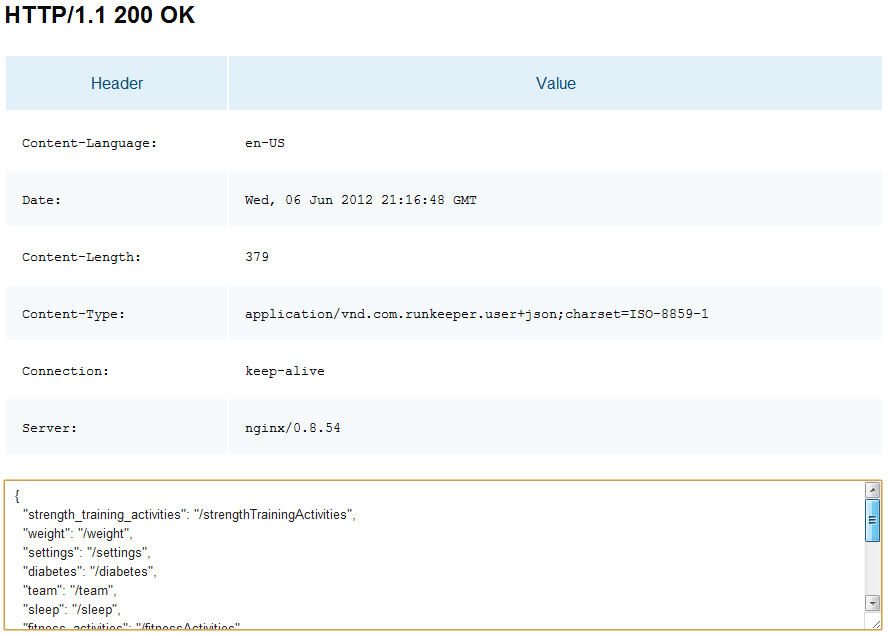
You can pass any valid Health Graph request in via the console. For instance, we can use the /user response to see what additional resources are available for this user, pick the /fitnessActivities resource, and then make a GET request to read the fitness feed.

If you’ve correctly specified your request, the Health Graph will respond with something similar to the following.

If you make an incorrect request, for instance by specifying the wrong content type that you’d accept back:

then you’ll receive an error response:

Note that the console supports using a */* wildcard for the Accept header content-type value. This enables you to make a request without knowing in advance what content type you’ll receive back in the response. This is particularly useful when you are exploring and learning the API, as you can note the content-type in the response so that will you know the correct value to use when creating your own application.
However you get to a correct request, once you have its response back, you can use the details to continue accessing and processing Health Graph data. That’s all there is to it!
For a quick overview of what Health Graph API operations are available, you may wish to read through this “Health Graph Hacking 101” presentation. For more details on the various resources available to GET, PUT, and POST to as part of the Health Graph API, please refer to the full Health Graph API documentation.
We hope this console proves useful as you explore and prototype with the Health Graph API. And we’d greatly appreciate any feedback you have for how we can make the console even better.
Cross-posted from the Health Graph blog.

The Stockholm Health Hack Day (@healthhackday) was a great success! Thanks to everyone who attended, spoke, organized, or otherwise assisted in the event.
Speaking of the organizers, they did a wonderful job arranging for video recording and streaming of many of the panel, presentation, and discussion portions of the hackathon. You can check out all the videos here, but I want to call your attention to these three Health Graph (@healthgraphapi) related videos in particular.
First, Oskar Henrikson interviewed me about RunKeeper and our vision for the Health Graph before the event:
Later that day I delivered a high level overview presentation on the Health Graph platform:
And we closed out the first day of content with a panel discussion about health technologies and consumer grade services:
The only session of mine that didn’t get video recorded was my more technical Health Graph workshop from the second day of the event. But fear not, slides are available!
Team presentations from the demo day were also recorded. One of the very neat things for me is that the top three teams used or have plans to use the Health Graph. You can watch the awards presentation to those teams here:
You can watch the demos from these and all the other teams by clicking here.
I’d love to hear your feedback on the event if you attended in person, or on the materials above if you participated online.
Cross-posted from the Health Graph blog.
While this post is targeted at attendees of the 18-20 May 2012 Health Hack Day events in Stockholm, even if you’re not attending you still might find some useful Health Graph information and development tips. If you aren’t able to attend in person, you can also watch the livestream online.
Welcome Health Hack Day attendees and hackers!
You’re in for a great weekend of hacking, networking, and fun. And who knows, maybe even a prize at the end!
This post will walk you through the key information and procedures you need to use the Health Graph during the hackathon.
First up, here’s a copy of our Health Graph programming primer to get you going (click through the presentation and note that links are live):
More details on some key points:
You can access more technical details on the RESTful Health Graph API by clicking here.
All Health Graph partners are required to follow the Health Graph API Policies.
When you’re ready to get started building a Health Graph API application, visit the RunKeeper Partner page and click “Connect To Our API“. From there you can fill out the form to register your new Health Graph integrated app, service, or device.
Click here to learn about authorization removal callbacks before providing your callback URL on the form. If you will be reading data out of the Health Graph for accounts other than your own app registering account, you should also request Read permission on the form, being sure you give a detailed explanation of what you will do with that data once you’ve accessed it. Likewise, if you would like to ask users for permission to retain their Health Graph data across deauthorizations, please request this permission on the form.
Note: Please include the official event hashtag, #hhd12, in your new application description and permission justification so we can address your request as quickly as possible.
Need some inspiration to get your developer juices flowing? Check out some of the applications built and deployed using the Health Graph API, available from the RunKeeper Apps page (click here). You can also access an archive of third party libraries, wrappers, and bindings which might make your Health Graph API-based development easier by clicking here. And there’s more information on how app and library partners are taking advantage of the Health Graph via our Health Graph partner profiles series on the blog.
When you encounter issues, you can ask questions and join in the developer conversation by visiting the Health Graph discussion group. You can also reach our team on Twitter, Facebook, and Google+.
Related content that may also interest you:
- Click here to learn how to export your own user data from the Health Graph; useful for backups as well as parsing your data to re-upload into a test account via the Health Graph API.
- The Healthy button allows you to easily embed the ability to share health and fitness related content on your site or blog into Health Graph users’ FitnessFeeds; click here to learn more about the Healthy button
Now that you know how to use the Health Graph, go build something great and win this thing! Happy hacking!

Cross-posted from the Health Graph blog.
In honor of our participation in Health Hack Day (@healthhackday) in Stockholm later this week (watch this space for slides and more details), I’d like to feature some European Health Graph (@healthgraphapi) partners over the next couple of weeks. This time, let’s look at how one of our newest strength training partners, Berlin-based Gym Hero (@gymheroapp), is using a streamlined approach to workout tracking coupled with the Health Graph to help people improve their fitness.
Bill Day: Please tell us about yourself and your work.
Gym Hero: We are Jannik and Jannis, the founders of Big Mike Alright, the small but nice company behind Gym Hero. Gym Hero is currently a side project we are working on in addition to our day jobs and college. We both love sports but are especially addicted to kitesurfing!
BD: What is the “elevator pitch” for why someone should use your app?
Gym Hero is a gym workout tracking app that learns from you while staying out of your way as much as possible. The user interface is streamlined and optimized to be used while you work out, even with shaky hands. Workout routines are automatically learned as you go, so you never have to enter a weight or name twice. You are free to name your workouts and exercises however you like – full flexibility instead of endless searching and browsing in predefined, fixed lists. Each of your workouts gets its own webpage (if you want) with all the details, so you can share, compare and discuss with friends.
BD: How did you get started using the Health Graph API?
We both have been using Runkeeper tracking for our cardio activities for quite some time now. Being data and statistics junkies, our weight goes into the Health Graph via a Withings scale, and our blood pressure is monitored and sent to the Health Graph via a Withings blood pressure monitor. We track our runs and the bicycle commute to work with RunKeeper.
Because we also love to work out we wanted to add our gym workouts to our Runkeeper profile as well. When we heard about the Health Graph API we wanted to join. Quantify yourself!
BD: How is using the Health Graph benefiting Gym Hero and your users?
The Health Graph community is a place where sports enthusiasts of all types meet to motivate each other, exchange, discuss and most of all track and measure their performance. It’s a great place to collect all your sports and health related data. So obviously, we wanted to allow our community to join the Health Graph family and vice versa.
And for the programmers reading this: The Health Graph really is easy to use and embed into your applications. Go try it out!
BD: Which portions of the Health Graph API do you use, and why?
Since Gym Hero focuses on doing one thing only, but doing it really well, we use the strength training portion of the Health Graph API. We feed full workouts including workout notes and exercise names into the Health Graph. We don’t track cardio or time based training (yet).

BD: What do you like about the Health Graph? What would you like to see changed?
We love the idea behind the Health Graph. Bringing together such a great variety of health data is simply awesome. On top of that it’s a breeze to integrate into other applications. Just keep up the great work!
BD: If you could request any new feature from the Health Graph, what would it be? How would you use it?
We would like to see a little more flexibility when it comes to defining muscle groups for each exercise. Our basic idea for Gym Hero is to give our users full freedom in naming their exercises/workouts. We would love for this to also be possible for muscle grouping.
BD: Can you share any future plans for your app? What’s coming next that your users will be excited about? Does the Health Graph play a role in that, and if so, how?
We’ve been updating every five to six weeks with new features and improvements, but there are a lot of updates still to come. We will extend the workout summary view for a better performance check, add data sync with iCloud and a workout timer to name only a few upcoming features.
Our users can also request and vote for new features. They can do this by clicking on the speech bubble in the app or by going here. Please help us build the finest workout app ever by making your requests. We love to hear from our users!
BD: Is there anything else we should know about you or your application?
If you want to track your gym activities and are looking for a slick app which is not blown up with useless stuff check out Gym Hero. Never leave without flexing!
Cross-posted from the Health Graph blog.
Health Hack Day (@healthhackday) slated for next month in Stockholm is accepting applications from teams interested in participating. Applications are due by the end of April.
I’ll be speaking on “Why We All Need an Open Health Platform” on Friday and then giving a workshop on using the Health Graph API (@healthgraphapi) on Saturday right before teams begin hacking.
Here’s the summary of what I’ll cover in the “Health Graph Hacking 101” workshop:
This workshop provides a crash course on developing using the Health Graph API and platform. We will discuss how to start using the Health Graph, provide an introduction to its OAuth based authorization model and RESTful API, and illustrate user flow through the Health Graph platform and partner applications. We will also feature third party libraries to make your Health Graph based development more efficient and examine test data creation and related tools. A preview of the material we will cover in this workshop is available from the links and presentation at: http://blog.healthgraph.com/about/.
I’m also very excited to be a part of the jury panel judging the hacks. Hope to see you and your hack there!
Cross-posted from the Health Graph blog.
Our ongoing partner profile series features partners doing interesting and important things with the Health Graph API (@healthgraphapi). In this installment, we speak with Uri Keren, President & CEO of HypnoCore, about his company’s Health Graph integrated sleep solution SleepRate (@sleeprate).
BD: What is the “elevator pitch” for why someone should use SleepRate?

UK: Sleep is a crucial component in our overall health and wellbeing.
On average we spend a third of our lifetime sleeping, but not many people realize the enormous effect sleep has on their lives. People who suffer from poor sleep are at a high risk of experiencing tiredness, negative mood swings, difficulty coping with high stress activities, difficulty maintaining healthy eating habits, weight problems, and a general deterioration in physical and cognitive functions.
SleepRate is the only solution in the market that uses widely available sports heart rate monitor (HRM) devices such as Polar, Garmin, Zephyr, and others to accurately measure and help improve sleep.
BD: How did you get started using the Health Graph API?
UK: SleepRate targets healthy people that already measure themselves using smartphones and heart rate monitor belts. We provide these people with accurate information and tools to help them measure and improve their sleep. Improving sleep in turn helps them to improve their health, sports performance, and overall well being. Given our focus around passive data collection using widely available commercial sensors and our desire to allow our customers to correlate their SleepRate data with other kinds of health and fitness information, the Health Graph API, especially the sleep related portion which we are using today, seemed like a natural fit.
BD: How is using the Health Graph benefiting your business?
UK: The Health Graph puts information relating to sports, sleep, and weight together in one place. This helps our customers manage their overall health while learning about their sleep habits and how those habits influence their other health parameters.

BD: What do you like about the Health Graph? What would you like to see changed?
UK: We like the wide variety of health and fitness related data available through the Health Graph. We would like to see more tools to help connect sleep quality to sports performance and weight management.
BD: If you could request any new feature from the Health Graph, what would it be? How would you use it?
UK: We would love to see the following sleep parameters (important to athletes) added to the sleep portion of the Health Graph API: Mean heart rate, mean respiration rate, and stress level.
BD: Can you share any future plans for SleepRate? What’s coming next that your users will be excited about? Does the Health Graph play a role in that, and if so, how?
UK: We currently support iOS using Polar compatible HRM devices. We are launching ANT+ support for iOS using the Wahoo dongle and an Android version supporting Polar and Zephyr HRMs soon.
BD: Is there anything else we should know about you or SleepRate?
UK: SleepRate is based on our FDA/CE certified and medically tested software algorithms that analyze sleep using R-R time analysis. We are the only solution in the market that can measure sleep accurately based upon heart rate information acquired using consumer-oriented, non-proprietary devices. SleepRate is now live and FREE (click here to learn more from our web site).
Cross-posted from the Health Graph blog.
Health Graph (@healthgraphapi) partner Wellframe (@wellframe) recently launched OneHealthScore. Read our interview with Jacob Sattelmair (@jakesatt) for more on how Wellframe is using the Health Graph to reframe the health discussion for consumers.
Bill Day: Please tell us about yourself and your work.

Jacob Sattelmair: I am the co-founder of Wellframe, the company behind OneHealthScore. We’re a health data science startup consisting of doctors, scientists, and engineers working to better leverage data to get people engaged in their health.
BD: What is the “elevator pitch” for why someone should use OneHealthScore?
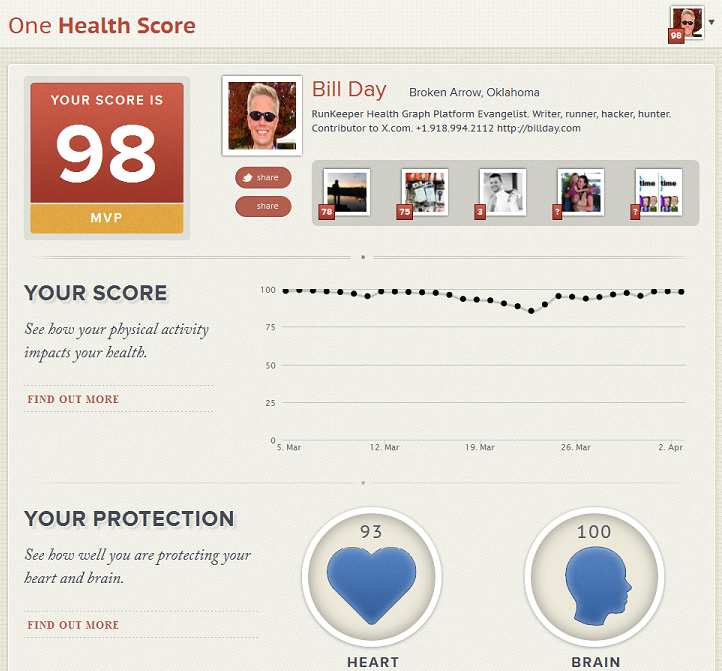
JS: OneHealthScore is a Health Graph app that gives you real-time insight into how your physical activity impacts your health. Your score is based on the most advanced scientific research on the health benefits of physical activity. Keeping track of your score is a great way to stay motivated and make sure you are protecting your health.
BD: How did you get started using the Health Graph API?
JS: As our team’s first project, we were looking for an opportunity to apply scientific models to health behavior data in a way that would help people get new insights and be more engaged in their health. The Health Graph API was the most obvious place to start to achieve this goal.
BD: How is using the Health Graph benefiting your business?
JS: Using the Health Graph is a great opportunity for us to access motivated users’ health behavior data and experiment with new ways of making that data meaningful and motivational to them.
BD: Which portions of the Health Graph API do you use, and why?
JS: To start we are focusing on physical activities — fitness and strength activities to be specific — as we chose to first model the impact of physical activity on health. However, we may eventually expand our model to include other data types available through the Health Graph, such as weight and nutritional intake.
BD: What do you like about the Health Graph?
JS: We love the fact that the Health Graph enables users to collect their health data across a wide range of applications and devices, and then to consent to share that data with other applications and services that enable them to get more value from those data.
BD: Can you share any future plans for Your service? What’s coming next that your users will be excited about?
JS: We will continue to iterate on OneHealthScore, exploring new ways to give users motivational insights that encourage them to do and track more activities with RunKeeper.
Cross-posted to the Health Graph blog.
We sometimes get questions about how to figure out the local time for fitness activities exported as part of a user data export.
Time and date information included in exported GPX files are normalized to universal time. See below for an example showing normalized times such as 2012-03-24T06:12:45Z.

Here are the steps you would follow to convert from universal time to local time:
- Read the normalized date and time out of one or more GPX export file track points
- Use the latitude and longitude in those track points to derive local time zone offset(s)
- Convert the universal time values in the GPX files into local time using the offset(s)
That’s all there is to it!
Cross-posted from the Health Graph blog.
We’ve received a number of questions about how to add the Healthy button to WordPress.com-hosted and WordPress.org self-hosted blogs.
To add the Healthy button to a WordPress.com hosted blog, you first need to select “Settings” and then “Sharing” from your blog admin panel. Next click “Add a new service” under “Available Services” and then configure it as follows:
- For “Service name“, enter:
Healthy - For “Sharing URL” enter:
http://runkeeper.com/share?healthyUrl=%post_url% - For “Icon URL” enter:
https://s3.amazonaws.com/static1.runkeeper.com/images/runkeeper-logo-16.png

Then click the “Create Share Button“. This places a representation of your new Healthy button under your “Available Services“. Drag that Healthy button to position it where you want it in “Enabled Services“; check that it appears as expected in the “Live Preview“.

Now verify that “Button style” is set to ‘icon + text‘ (assuming you want to include both) then click “Save Changes” to enable Healthy button sharing on your blog!
You can see this in action at the bottom of this blog post. Push the button and submit your comments to see this post show up in your FitnessFeed on RunKeeper.com.
What if you’re running the WordPress software yourself instead of using WordPress.com? If you self-host your own WordPress based blog, you can install this plugin from third party developer Matthew Chan. Matthew’s plugin will place the Healthy button at the top of single posts in your blog.
However you host your WordPress-powered blog, make sure it’s Healthy!
Cross-posted from the Health Graph blog.
The winner of our AngelHack prize for best use of the Health Graph (@healthgraphapi) was Fitgiver (@fitgiver) with their app enabling Health Graph users to raise money for the causes they love by doing the things they love to do anyway. One of Fitgiver’s founders, R. Colin Kennedy (@rcolinkennedy), took time out of a very busy schedule to answer a few questions for us. Take his experiences as inspiration to build great things at a hackathon near you, too!
Bill Day: Please tell us about yourself and your team.

R. Colin Kennedy: The Fitgiver team comes from a variety of backgrounds – some of us work at startups, some of us have a background in big business, and another is staff at MIT – but what unites us the opportunity that Fitgiver presents to create a meaningful impact.
BD: How did you get involved with AngelHack? And why did you decide to try out the Health Graph API?
CK: Well, a few of us ride bicycles together and had been kicking this around for a while. AngelHack was a great opportunity to move things to the next level. We had each individually done hackathons and Startup Weekends on other projects, and AngelHack promised a higher level of visibility, great prizes, and uniqueness because it was the first time running it in Boston.
The Fitgiver concept was tied to the Health Graph from its very inception. When we ride together, several of us use RunKeeper to track our activities. We knew that creates a data stream that is accessible and we thought we’d try and put it to use for causes we care about.
The beauty of it is that once users connect Fitgiver with their Health Graph account, they don’t actually have to do anything differently than they already were: Just use RunKeeper like normal, and we pull the data. [Editor’s note: This should work with other Health Graph-based fitness activity tracking apps as well.]
BD: What is the “elevator pitch” for why someone should use Fitgiver?
CK: There are at least two different answers to that question.
First, our elevator pitch is that Fitgiver connects people and the causes they care about with organizations that want to sponsor them.
Second, users should consider Fitgiver because if they’re already going for a run or ride anyway, why not do some good while they’re at it?
BD: How is using the Health Graph benefiting Fitgiver? Which portions of the Health Graph API do you use, and why?
CK: The Health Graph makes data collection super easy. Currently, we’re using the workouts people track with RunKeeper. This is great because we also get the geo data, which we can use to verify that these workouts were real workouts, and at some point we’re thinking about localizing sponsorships so local businesses can sponsor local athletes. This really opens up a very powerful potential for both charities and small businesses to support people that are in their communities.
BD: What do you like about the Health Graph? What would you like to see changed?
CK: So far we’ve been really happy with the reliability and documentation with the API. It just works!
BD: Can you share any future plans for Fitgiver?
CK: We’re in talks with national health-related charities, and with sponsor companies that are looking like potential launch partners. Feedback has been so positive, we just have to keep going.
BD: Is there anything else we should know about your team or your application?
CK: We are all RunKeeper users and athletes, and have been so excited by the level of support that we’ve gotten from the RunKeeper team. Looking forward to furthering the partnership!
Cross-posted from the Health Graph blog.

 BillDay.com