- Family walk with some running at the end. 9:29 mile-3, 8:46 pace at very end. http://t.co/A6E7Lmdn #RunKeeper #
- I made it official: Registered for the @Route66Marathon November 20th. Watch for more as I train and live stream my race via @RunKeeper #
- iOS Health & Fitness apps exploding, to 13K by 2012 http://t.co/nSYp3HwJ *but* there's only one @RunKeeper !!! #
- New content locations on the @X_commerce developer site http://t.co/MKyKQjgu / cc @PayPalX @eBayDev @Magento #
- Tiger blood and Adonis DNA for sure! RT @jjacobs22 Our rental car screams 'winner' #youknowyouarejealous http://t.co/0x3I7a0C #
- I love the amazingly fast answers I get from @dreamhost whenever I have an issue. Much appreciated, DH team! #
- Best and deepest coverage I've read of Facebook's new Timeline and plans for the Open Graph http://t.co/iDa6ZuVM #
- Course map for the @Route66Marathon http://t.co/qvs5hEyh #
- "RunKeeper-iOS" Objective-C wrapper for accessing the @RunKeeper @HealthGraphAPI from iOS 4.0 or newer http://t.co/Jfyt5UzO #
- Merchants and @X_commerce developers: @Magento now supports #Facebook Open Graph 2.0 http://t.co/hY4lcSZv #
- 7.18mi on a beautiful bluebird day! http://t.co/l39arCpC #RunKeeper #
- From my @PayPalX blog: A history of microfinance and crowdfunding http://t.co/jHConZMJ #
- Part 3 of my "@X_commerce #Android Apps the Easy Way" series introduces the RESTful eBay APIs http://t.co/3dqeCoJK / cc @eBayDev @PayPalX #
- Why I'm teaching my children to hunt http://t.co/tsfY2nkU (thanks @stevenrinella!) #
- "Write like you talk. Often." http://t.co/igmtNYke #
- Cool 4mi hill including Bass Pro loop. http://t.co/YFPMhZgR #RunKeeper #
- From my @PayPalX @X_commerce blog: Google Wallet launches on Sprint with Citi Mastercard http://t.co/u4wUDx8G #
- Note to self: Rename multiple files with same prefix via: mmv "*" "prefix_#1" #
- We all need to think very carefully about who our services really benefit http://t.co/OWKHfGb5 from @bryce #
- Part 4 of my "@X_commerce #Android Apps the Easy Way" concludes the series with an example eBay app http://t.co/7szihj5Y @eBayDev @PayPalX #
- To our kids: Mom and Dad ready for their first flight. Love you! http://t.co/Yl1jPaRk #
- Our plane to Chicago http://t.co/iySlVdUK #
- Building a NFC enabled Android application with PhoneGap http://t.co/xdm5ex4D #
- Getting physical with Android, NFC and the ADK http://t.co/qf4mHF6p #
- I've never figured out the creepy baby lifejacket figure http://t.co/RI0KWf08 #
- O'Hare's F4 at ORD http://t.co/NnowMX8I #
- Been traveling all day to see this sign! http://t.co/lS4vlOv0 #
- Being in "your" space during a negotiation is even more critical than you think http://t.co/QlHVdfJU via @HarvardBiz #
- Bloomberg has a fantastic look inside Amazon's Kindle Fire http://t.co/05GtuUxM (the key: it's a service, not your run-of-the-mill tablet) #
- How to tell if a client is legit or a "tire kicker" http://t.co/QIp4uDOh and what to do if they're the latter #
- Excellent cap tables discussion by @fredwilson http://t.co/EPSMdsLi #
- On the absurdity of shoe names http://t.co/HrjpJKUt #
- Just completed a 2.32 mi hike – Nice hike up the Flume Gorge. Wet! http://t.co/BCxsuwHl #RunKeeper #
- Remember this sign, it will be important later http://t.co/L8YS6U52 #
- Enjoying Fall in the White Mountains of New Hamshire http://t.co/WG8WDlHY #
- Albany covered bridge, White Mtn Nat Forest, NH http://t.co/Y99JX8HN #
- Fall colors at the pass http://t.co/fcWboK3r #
- Another view from the pass http://t.co/lqSfiMk8 #
- Flume Gorge, Franconia Notch State Park, NH http://t.co/YFZ18Odb http://t.co/JJq3QLh9 #
- Lake in the White Mtns http://t.co/UNiU95jb #
- This is why it's important to heed those moose crossing signs http://t.co/TZbfxhLX #
- More views of Flume Gorge http://t.co/TzhyE1G6 http://t.co/dnrgj3iB #
- Portland Head Light. http://t.co/MNYB7Oal http://t.co/2D4YnZqZ #
- King…Lobster? http://t.co/0I4IWd6e #
- In Pemiquid Point Light tower. http://t.co/AYsUblTC http://t.co/GvZil9C3 http://t.co/ZkvGVZUR #
It's been a little over fourteen months since I started regularly blogging on X.com. A lot has happened during that time in the world of payments, and for me professionally, too. I have some personal news to share in a moment, but let's recap payments developments and look at next month's big ticket item first.
Each month or so I've tried to post PayPal and payments highlights. Here's a quick rundown of those since last summer:
July 2011 | June | May | April | March | February | January 2011-December 2010 | 2010 semiannual (July-December) | November | October | September | August | July 2010
Note the gap for August and September 2011 highlights. There's been so much going on with the new X.commerce including recent X.com site rework, plus lots of other big news in payments and the larger development world, that I've decided to link directly to weekly highlight posts on my own site so you have all the latest. Drill into each for the most important payments news from that week.
- Week ending 7 August 2011
- Week ending 14 August
- Week ending 21 August
- Week ending 28 August
- Week ending 4 September
- Week ending 11 September
- Week ending 18 September
- Week ending 25 September
As we head into October, all of the recent developments above point to one place: the X.commerce Innovate Developer Conference in San Francisco.
I've written previously about PayPal's strategy and vision which will be on full display at Innovate. I've also pointed you to the conference site including speakers and schedule, and teased you with a report that a big Facebook related announcement may be coming at Innovate. Now my only question to you is, will you be attending Innovate to take it all in for yourself?
I ask because I'll be there meeting people, studying the latest in payments, and covering the conference for an upcoming X.com article. And I'd love to meet you and get your take on payments and X.commerce. In fact, I'll also be at Android Open the two days immediately before Innovate; if you'll be attending that conference, I'd love to get a chance to chat there, too. Please leave a comment below if you'd like to get together at either event.
And there's one more thing…
I've accepted a new position which I'll be starting soon. Though I will still write articles for X.com from time to time, I will no longer be blogging regularly there. So if you'd like to keep up with my ongoing thoughts on payments or get the skinny on my new digs, please follow me on Twitter (@billday) or subscribe to my personal blog (BillDay.com).
Good luck, have fun, and never stop learning!
 TechCrunch published an article this week noting that Internet journalist extraordinaire Robert Scoble "revealed that PayPal is launching something big with Facebook in two weeks", presumably at the X.commerce Innovate conference.
Read the TechCrunch piece for more information on who they've spoken with to confirm the pending announcement to their satisfaction.
Once you've satisfied yourself that something's probably going to be announced (and I by no means have any insider information on this, I'm merely reading the same public scribblings that you are), it's time to start your speculation engines. Here's what TC guessed might be coming:
A likely possibility is a Facebook partnership on the new X.Commerce platform, which is a division of eBay, Inc. and is expected to bring together elements from eBay, PayPal, Magento and GSI Commerce. According to PayPal, X.commerce will feature a “fabric” that stitches the platform together to create new experiences for retailers and their customers. A number of partners will be announced (already Adobe and Kenshoo have been revealed as partners), so Facebook could be part of this group.
If I were a gambling man, I'd have to say the above strategic announcement is a no-brainer. Such announcements are easy to do and get both sides some cache while giving each time to figure out exactly what they want to cooperate on with the other.
But what if Facebook and PayPal wanted to get more specific and tactical? TechCrunch went on to say:
PayPal could also announce a deal similar to the one American Express formed with Facebook, which links your credit card account with Facebook to offer users special exclusive deals. If you buy the deal item with your AmEx card, you will be credited the deal amount. The deals you see are influenced by what you and your friends “like” on the Web using the Facebook like button. PayPal already offers deals but a deeper integration with the social network would help close the redemption loop.
I'm fascinated by the possibilities with this second one. Square's been coming after other payments players with localized coupons and loyalty programs in their Card Case, and I'd love to see a response from PayPal that takes the game back to them, upping the ante by utilizing the power of Facebook's social graph.
What other opportunities do you see in a possible Facebook-X.commerce partnership? Please leave a comment on the complete X.com post with your thoughts.
This is the fourth and final article in my series on using Google’s App Inventor for Android and eBay web APIs to build Android commerce apps.
The first article walked you through how to install App Inventor and start using it to build and share Android apps. It also discussed some of the limitations of App Inventor versus the full Android SDK including the latter’s ability to deploy apps into the Android Market. The second article discussed the available App Inventor components including how to visually select and connect them to build Android apps capable of accessing arbitrary web APIs. And the third article introduced the various eBay APIs and developer tools. If you followed along with it, you are now setup with the requisite eBay application keys that you’ll use in the commerce app examples in this article.
Now that the stage is set, let’s build on all the previous information. We will use App Inventor and eBay’s API Test Tool to develop and deploy an example Android app that uses the eBay Shopping API.
A couple of calls in the Shopping API
If you didn’t previously dig into the Shopping API while reading the third article in this series, now would be a good time to do so. Click here to access the Shopping API “Call Reference“. From that page you can drill down into each of the particular Shopping API calls available to you.
We could pick any of these API calls to use, but for the sake of simplicity here, I’d like to focus on these in particular:
- GeteBayTime – returns official eBay system time (in GMT) when the request is processed; a good first call to make as it requires minimal input parameters and returns an easy to parse and understand response.
- GetUserProfile – retrieves public user information; you submit a user ID of interest and eBay responds with information about the user’s feedback, About and Seller item URLs, and more.
Time to talk to eBay!
Now let’s build an app that talks to the eBay servers. Since it is our first, let’s keep it absolutely as simple as possible: We’ll call GeteBayTime and display the returned official system time.
To start, launch the eBay API Test Tool. Note that you need to be logged in using the eBay developer account you created in the previous article.
Within the API Test Tool, select “Shopping API” and then the API call “GeteBayTime”. Now you should be able to click the blue “Submit” button on the right side of the tool. If all goes well, you can should get back a successful call response. Expanding the sections of the call request, you should see something like this:

The API Test Tool has provided us with some valuable time saving information: It’s spelled out exactly what we need to pass into the eBay Shopping API service to request an eBay time response.
For simplicity’s sake, we might prefer to put all of the particulars of our request into URL encoded parameters. You can find the URL format in the GeteBayTime Samples portion of the call reference page. For the example above, noting that we are running the Sandbox rather than Production environment and that you need to change the appid parameter to your own Sandbox appid, this call would be:
http://open.api.sandbox.ebay.com/shopping?callname=GeteBayTime&responseencoding=XML&siteid=0&version=733&appid=YourAppId
This URL gives you a response like the one pictured in the API Test Tool screenshot above. If you’d prefer a JSON response, you can modify the responseencoding parameter’s value to be JSON:
http://open.api.sandbox.ebay.com/shopping?callname=GeteBayTime&responseencoding=JSON&siteid=0&version=733&appid=YourAppId
Requesting a JSON response results in something akin to:
{
  "Timestamp" : "2011-08-17T06:48:53.437Z",
  "Ack" : "Success",
  "Build" : "E733_CORE_BUNDLED_13633517_R1",
  "Version" : "733"
}
Hopefully this is all looking strangely familiar to you. It should be, because we’re using eBay’s web APIs in a very similar manner to how we used Yahoo PlaceFinder to request a geocoded JSON response back in the second article in this series. Click here to revisit that article if you need a refresher.
Since we’re sending the same sort of HTTP GET web API request and getting back the same sort of JSON response, we can in fact reuse a great deal of our example app from the second article, too. Let’s select and configure similar components to create our new GeteBayTime app. Here’s what it looks like in the App Inventor Designer once we’ve got all the components in place:
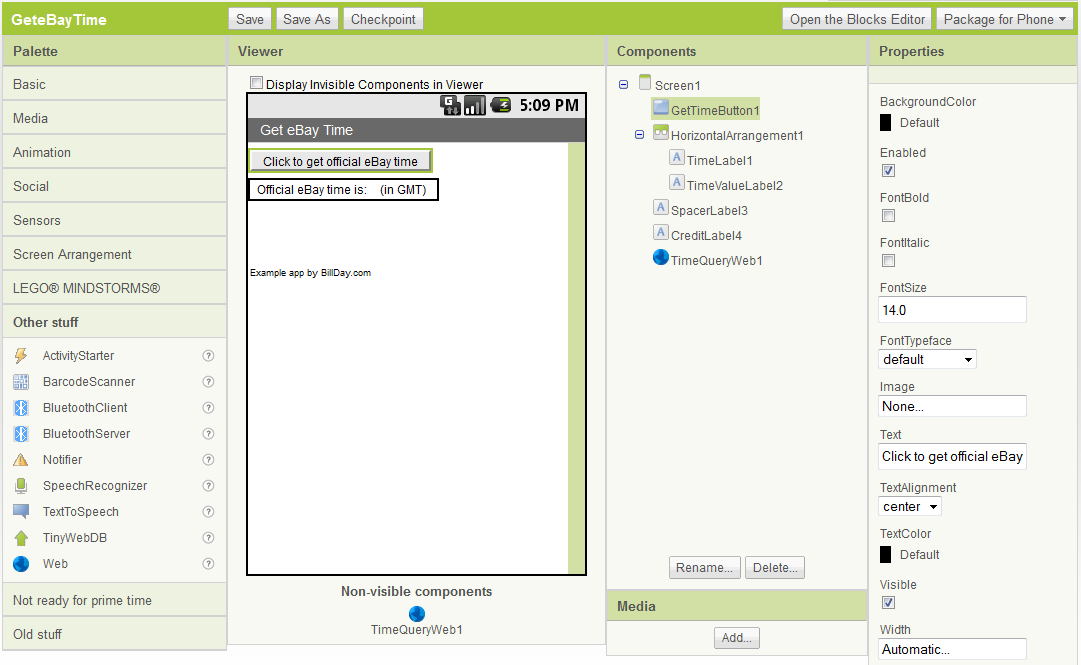
We can also use a similar process to the second article’s to wire up the various components, events, and actions. Here’s what the input portion of our logic looks like in the App Inventor Blocks Editor:

The input processing does the following (note that you read the visual representation above from right to left):
- Append the value of the
appidvariable to the rest of theGeteBayTimeAPI call URL - Sets
TimeQueryWeb1‘s URL to the value generated in step 1 - Calls
TimeQueryWeb1.Get, a HTTP GET call using the URL above
Note that I did choose to define an appid variable this time around rather than hard wiring that in. After you download the example from GitHub (click here to download the project ZIP) and then upload it to you App Inventor workspace, you would need to change yourappid to your own value in order to execute the example app.
Wiring up a simplified version of the second article’s response processing logic, I get the following:

Here’s what the response processing does:
- Take the eBay server JSON response stored in
responseContentand split the response into two portions; first portion ends in"Timestamp":(which means the next portion begins with the JSON encoded timestamp value of interest) - Select the second portion to keep (JSON encoded timestamp value is now at the head of the portion kept)
- Split the portion kept at the first comma (first portion now contains only the JSON encoded timestamp value)
- Keep the first portion (JSON encoded timestamp value)
- Decode the remaining text (removes JSON encoding, leaving us with just the timestamp value)
- Display the timestamp value in the
TimeValueLabel2via it’sTimeValueLabel2.Textfield
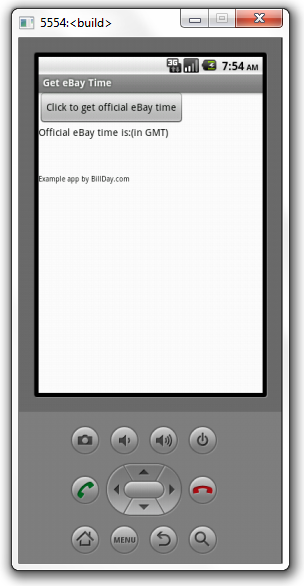
Launching the app in the Android emulator should then give the following after startup:
Clicking the “Click to get official eBay time” button in turn should fetch a timestamp and display it. Here’s what I saw when I ran this to take a screenshot:
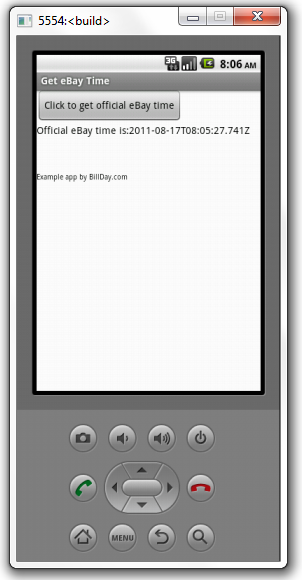
You could certainly perform some clean-up on the timestamp if you like. But the important point here is that it is straightforward to access eBay APIs using the same App Inventor components we use to access other web services. And parsing and using the provided information couldn’t be much simpler!
You can access this series’ examples on GitHub (click here). Alternatively, jump straight to downloading the GeteBayTime project ZIP and/or APK executable if you like.
Getting more complicated responses from eBay
Suppose instead of just official eBay time, we wanted to request something with a more complicated response.
For instance, we could call GetUserProfile for the test Sandbox user TESTUSER_magicalbookseller. Again requesting a JSON response:
http://open.api.sandbox.ebay.com/shopping?callname=GetUserProfile&responseencoding=JSON&siteid=0&version=731&appid=YourAppId&UserID=TESTUSER_magicalbookseller
This would return something similar to:
{ "Ack" : "Success",
  "Build" : "E733_CORE_BUNDLED_13633517_R1",
  "Timestamp" : "2011-08-17T08:33:50.269Z",
  "User" : { "AboutMeURL" : "http://members.sandbox.ebay.com/ws/eBayISAPI.dll?ViewUserPage&userid=testuser_magicalbookseller",
      "FeedbackDetailsURL" : "http://feedback.sandbox.ebay.com/ws/eBayISAPI.dll?ViewFeedback&userid=testuser_magicalbookseller&ssPageName=STRK:ME:UFS",
      "FeedbackPrivate" : false,
      "FeedbackRatingStar" : "Blue",
      "FeedbackScore" : 59,
      "NewUser" : false,
      "PositiveFeedbackPercent" : 100.0,
      "RegistrationDate" : "2010-01-01T00:00:00.000Z",
      "RegistrationSite" : "US",
      "SellerBusinessType" : "Undefined",
      "SellerItemsURL" : "http://search.sandbox.ebay.com/?sass=testuser_magicalbookseller&ht=-1",
      "Status" : "Confirmed",
      "UserID" : "testuser_magicalbookseller"
    },
  "Version" : "733"
}
We would perform the same sort of parsing operations as before, just more times. Once parsed, we could use the user’s feedback, seller, and other information however we liked (within eBay’s developer-partner policies, of course).
The same approach applies to any other part of the eBay commerce APIs. Why not explore the eBay developer documentation to see what’s possible, then give it a try yourself?
Recent developments
As I was finishing this final article in my App Inventor X.commerce series, Google announced they would be discontinuing support for App Inventor.
That’s the bad news. The good news is, they are transitioning App Inventor to open source. And even better, MIT is picking up the banner with a new Center for Mobile Learning whose first activity will focus on App Inventor. Click here to read the MIT press release and here to read the announcement on the Google Research blog.
You can also learn more about the transition and what it may mean for App Inventor users from the author of O’Reilly’s “App Inventor” and the App Inventor Blog, USF Professor David Wolber (@wolberd). Professor Wolber is delivering a free O’Reilly webcast, “What’s Next for App Inventor?” (if the webcast has already occurred by the time you read this, search the O’Reilly webcasts site for an archived version).
I’ll be watching the open sourcing of the tool and MIT’s involvement closely in the coming months. I truly hope this begins a new positive chapter for mobile app building by the masses.
If for some reason the App Inventor transition doesn’t pan out as hoped, there is another technology to consider on the ease-of-mobile-programming front: PhoneGap (@phonegap). I’ve written a little bit about PhoneGap on the X.com DevZone blog previously. While PhoneGap does require some coding, its barrier to entry is relatively low. It enables you to build native apps, able to access device hardware such as sensors, using just HTML, JavaScript, and CSS. And it enables you to package and deploy those apps in available app markets, not just for Android but also iOS, Blackberry, Symbian, HP/Palm’s WebOS, and Samsung’s Bada platforms. I hope to write more about PhoneGap soon.
Conclusions from our series
In this series, I’ve introduced you to both App Inventor for Android and the eBay web APIs. I’ve shown you how to setup your system for development with each of them. If you’ve been following along you’ve built two example Android apps using web APIs. You should now see how to extend what you’ve learned to write Android apps against any of eBay’s APIs, or against just about any arbitrary web API for that matter.
I hope you can now appreciate the power of a visual programming plus web API approach to development. One can build a lot of interesting apps very quickly using this approach. And even if you don’t deploy them, you can use this capability to build rapid prototypes and explore design ideas.
Please let me know if you give App Inventor a try for building against any of the X.commerce APIs. I’d love to hear your feedback on how it went and any difficulties you might encounter.
Until then, happy visual commerce hacking!
 Google has launched their NFC-based Google Wallet payment solution. Click here to read the announcement post.
There are some very particular requirements to use this first public release including:
- You must have a Nexus S 4G phone on the Sprint network
- You must pay with a Citi MasterCard or Google Prepaid Card (the latter is fundable using other credit cards)
If you have just the right hardware, network, and a workable card, trying out Google Wallet should be fairly straightforward. According to the announcement:
In May we announced Google Wallet—an app that makes your phone your wallet—with Citi, MasterCard, Sprint and First Data. With Google Wallet, you can tap, pay and save using your phone and near field communication (NFC).
We’ve been testing it extensively, and today we’re releasing the first version of the app to Sprint. That means we’re beginning to roll out Google Wallet to all Sprint Nexus S 4G phones through an over-the-air update—just look for the 'Wallet' app.
Google's announcement also mentions that Visa, Discover, and American Express have each made their NFC specifications available, hinting that this might enable support for their cards to be added to Google Wallet at some point in the future. Of course, that support also might not be added, who knows until it's a done deal.
For more information on Google Wallet, you can read coverage from Wired and Mashable. You can also watch Google's launch video embedded in the announcement (click here to watch on Youtube).
I've written a fair amount about mobile wallet competition over the last year. In my opinion, it's too early to call the ultimate winners and losers. But with Google Wallet, Google is clearly in the game with PayPal. It will be very interesting to see how Wallet plays out versus PayPal's all encompassing vision and solutions.
Who do you think has the advantage, if any, in the mobile wallet wars? Please leave a comment on the complete X.com post.
This is the third article in my series on using App Inventor for Android and eBay Web Services to build Android commerce apps.
The first article introduced App Inventor including how to install and start using it to build and share Android apps. The second article outlined the available App Inventor components. It then focused upon using the “Web” component to access web APIs. Yahoo PlaceFinder was used to provide a specific example (click here to download the example files from GitHub).
Taken together, the first two articles gave you the basic tools and information you need to visually create Android apps that use arbitrary RESTful web services. Now let’s get more commerce-specific by learning about the eBay APIs and what you can do with them.
eBay developer information and account setup
As you get started with the eBay APIs, it’s useful to note several eBay developer resources that might be of use to you. I wrote about some of these in a recent DevZone blog post, but they’re worth repeating here to make sure you don’t miss any of them. They are:
- The eBay Developers Program homepage is your logical starting point; links to API information, documentation, support, a quick start guide (when in doubt go here first), code samples in various programming languages, tools and SDKs, and much more.
- Read the eBay Developers Program blog for the latest official information. Click here for the feed. You may also wish to follow the eBay Developer Program Twitter account (@eBayDev).
- Subscribe to the eBay Tech Blog for in depth information on how the eBay system is constructed, maintained, and operated.
As I discuss above, the Quick Start Guide is the best place for you to start if you’re new to the eBay APIs and developer program. If you aren’t already a member of the program, the first step in the guide is to join for free. Click here to read about the benefits, and here to join .
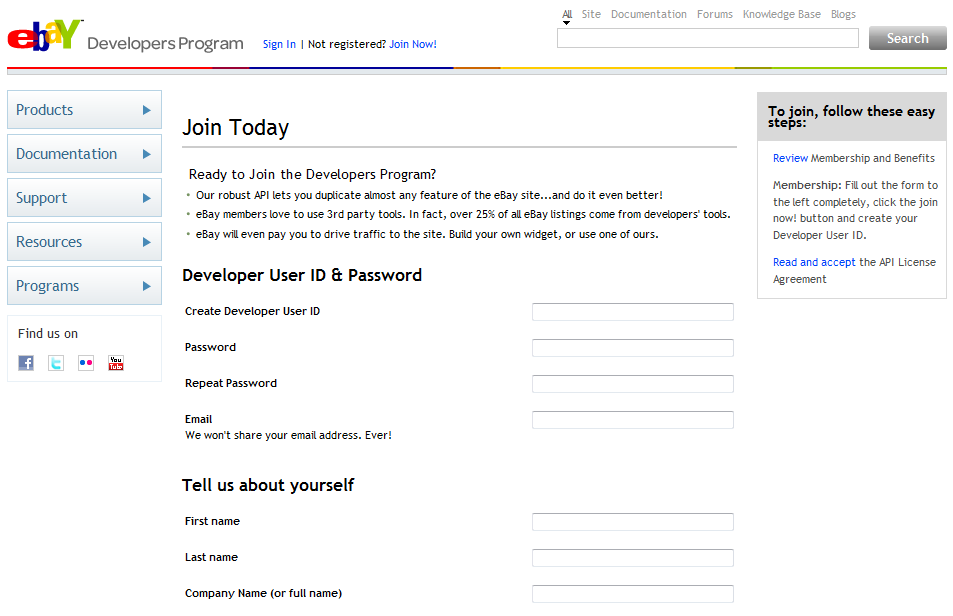
Once you have an account, you should get your application keys and use them to run the sample application to make sure everything is working correctly. Note that you need “Production”, not “Sandbox”, keys to execute the sample app.
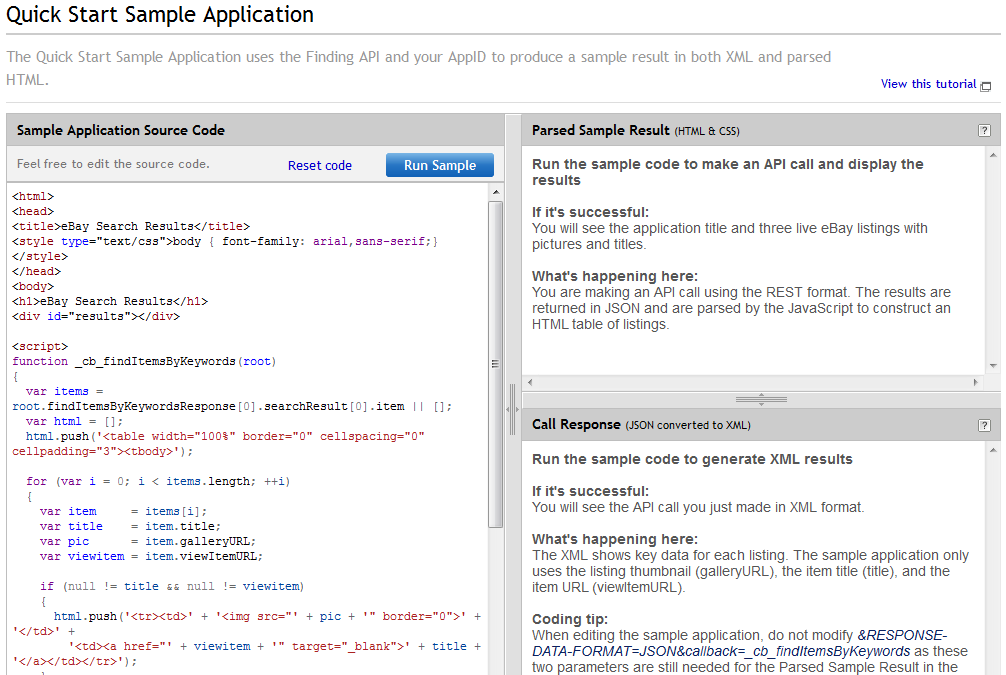
After you click “Run” and the sample application executes, you should see eBay search results and the JSON server response in the output panes:
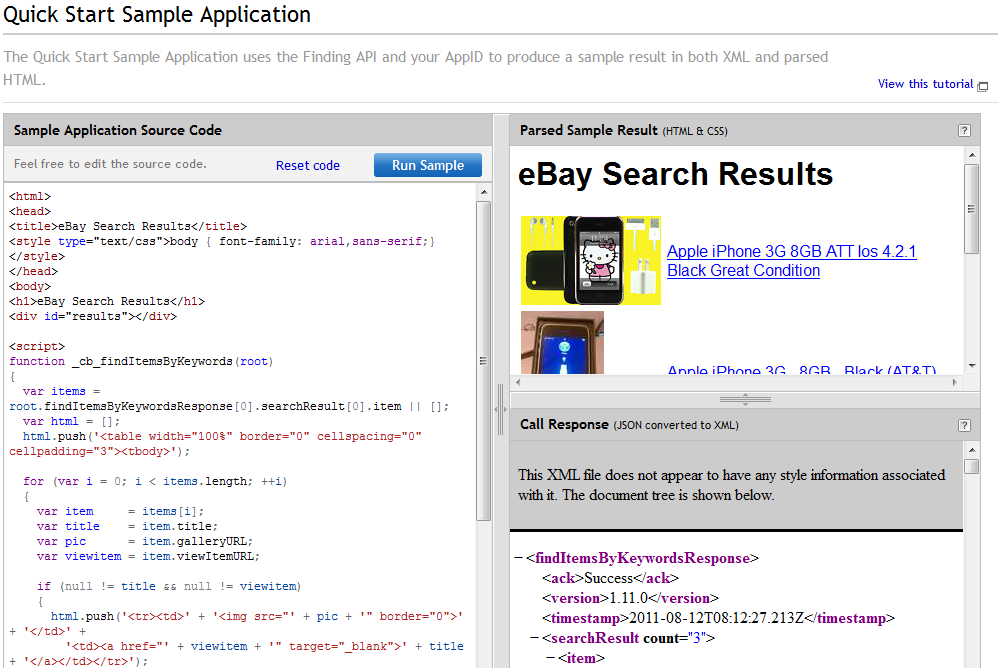
Assuming you see successful output similar to the above, you have successfully created your application keys and are ready to proceed with eBay development. eBay provides links to a number of “developer centers” with more information on using their API with given languages and technologies. As of this writing the currently available centers include:
- JavaScript Dev Center – for JavaScript, JSON, and AJAX
- Flash Dev Center – ActionScript or Flex
- PHP Dev Center – PHP, Perl, or Python
- Windows Dev Center – .NET, C#, ASP, or VB
- Java Dev Center – Java and/or JSP
Before we start writing our own code to use the eBay services, however, it’s worth spending some time getting to know the eBay APIs and what you can do with them.
eBay APIs overview
eBay provides information on its various APIs from the eBay Web Services Overview page. I would encourage you to read through the descriptions provided there for each particular API. I’ve done my best to paraphrase the key capabilities below, but reading the original descriptions from eBay would be a very good idea to make certain you didn’t miss any critical points.
eBay APIs include:
- Finding API – used to search for items; among other things, you can get recommendations for search keywords; search for items by keyword, category, product identifier, and store; and get category and domain meta data.
- Trading – authenticated access to item listing data, seller sales status, and fulfillment information
- Large Merchant Services – file based, asynchronous execution of large number of transactions
- Best Match Item Details – authenticated access to private eBay data enabling sellers to better understand factors affecting their search ranking
- Open eBay Apps – used to embed applications where sellers manage their businesses on eBay.com
- Product Services – provides the information sellers need to list items with Parts Compatibility
- Research APIs – retrieve historical eBay data (free for up to 1,000 price research non-commercial calls per month)
- Shopping – access public read-only data for items, products, eBay member profiles, and more
- Merchandising – access to product and item information used to up-sell or cross-sell
- Feedback – manage account-level Feedback data, specifically Detailed Seller Ratings (DSRs)
- Server Notifications – useful for server-side applications receiving and processing eBay events
- Client Alerts – enables light-weight client retrieval of alert messages
eBay provides a number of tutorials to help you get started with these APIs. These tutorials include:
- Finding API tutorial
- Shopping API tutorial
- Merchandising API tutorial
- Trading API tutorial
- Shopping and Trading APIs for affiliate developers
Before proceeding with API calls, it might also be useful for your to read “Making an API Call“. This document discusses request and response formats, call structure, syntax, testing information, how to handle failures and errors and more.
eBay developer tools
eBay also provides tools to help you try out API calls and test deploy before having your application interact with the Production eBay server.
The API Test Tool is a developer console of sorts that lets you try out specific API calls. It shows you the web service endpoint, HTTP headers, and XML request sent to the server. It also provides the call’s server response for your review. Taken together, this information can help you quickly prototype calls you wish to make against the eBay systems.

eBay’s Sandbox lets you deploy your applications against a test server, saving you from potential headaches (or worse) if you were to deploy a buggy application against the ebay Production server. You can access the Sandbox via the “Quick Links” at the left side of the main eBay Developer Program page after you’ve created an account and logged in.

I would encourage you to thoroughly explore these tools as you work through the previously linked tutorials and documentation for the eBay APIs. The more comfortable you are with the tools and APIs, the faster your commerce application development will be. We’ll make use of some of these tools again in the next article when we develop API calls to use in our Android app.
What we’ve learned so far and what’s next
In this article, you’ve learned about eBay developer resources and how to get started with the eBay APIs. You should now have your eBay application keys at the ready. You should also have the links you need to jump to the various eBay API documentation and tutorials to learn more about what each of the APIs does and how to go about invoking them. And you should be building familiarity with the provided eBay developer tools including the API Test Tool.
The next article in this series will build upon all of the previous ones. In it we’ll create an example Android app that uses eBay’s APIs to carry out some commerce transactions. Android eBay mobile commerce, FTW!
 "The History & Evolution of Crowdfunding" (@mashable) caught my eye recently because it delves into some of the recurring themes of microfinance and crowdfunding that I’ve written about in preceding months.
The article starts off by defining microfinance as "lending money to low-income individuals" and then lays out what it will cover:
While modern microfinance has gained traction thanks to the web, the practice has actually been viable for some time. Here’s a look at how it evolved and how the Internet is bringing it to more and more people.
Subsequent sections discuss Dr. Mohammad Yunus' Nobel Peach Prize-winning work pioneering modern microlending. It then shifts from Yunus' work and the Grameen Bank that grew from it into a discussion of Kiva.org and microlending online. It ultimately moves into the emergence of crowdfunding for creative projects (Kickstarter, @kickstarter) and equity investments (the author's own business).
I would recommend giving the entire article a quick read to fill in any gaps you might have in your microfinance knowledge base. Be sure and click through to some of the mentioned services for more information on how they implement the various aspects of microlending and crowdfunding. You might want to get involved with one or more of them, depending on your own personal situation and charitable endeavors.
For additional perspective and depth, you might also want to (re-)read some of our previous coverage of microfinance and crowdfunding. Be sure and pay particular attention to my article "Ending Poverty One Small Loan at a Time: Adam Feuer on the Mifos Initiative" and Travis Robertson's piece on funding projects via Kickstarter.
If you have any recommendations for other microfinance services, please let me know by leaving a comment on the X.com post.

By now you've probably noticed that PayPal has launched its reworked X.com site in anticipation of merging in the eBay and Magento developer sites in the near future.
All in all, this is a good thing. But there are some issues that you, as a developer community member, should be aware of. The biggest in my opinion is the fact that many content locations have now changed, and redirects are not in place for all of them to automagically transport you to the correct new location.
Here are a couple of examples I've bumped up against with my own writing and content:
First, my blog posts formerly appeared in the DevZone section at https://www.x.com/developers/paypal/devzone/blog with date strings included in their path; they are now located at https://www.x.com/developers/community/blogs/billday without any date strings.
For example, my July highlights post which was formerly at https://www.x.com/developers/paypal/devzone/blog/2011/08/04/summertime-and-the-highlights-are-easy is now at https://www.x.com/developers/community/blogs/billday/summertime-and-highlights-are-easy.
Second, my X.commerce articles were formerly published with URLs such as https://www.x.com/docs/ with a DOC number at the end, e.g. https://www.x.com/docs/DOC-3752 for the final part of my "Alternative Payment Systems" series.
Articles are now published at URLs beginning with https://www.x.com/content/, with the hyphenated article title appended. For the article above, for instance, the new location is https://www.x.com/content/alternative-payment-systems-part-6-comparing-options.
What should you do if you're looking for a particular piece of content and can't find it? I'd suggest searching for the title of the missing item using the "search x.commerce ecosystem" search box in the upper right of X.com pages. So far that's turned up everything I needed to find.
What other rough edges have you found in the site redesign? Please give the X.com team your feedback by leaving a comment on the full X.com post.

RunKeeper and the Health Graph API
- "Beers, Brilliance, and Baby Tooth" http://t.co/bZlQHS8P @RunKeeper hackathon recap from @sarahhodges #
- Another @RunKeeper hackathon write-up http://t.co/sktfk5ew (this one from @terriblelabs) including video of the event http://t.co/YBxAAPUQ #
- The future of health and fitness http://t.co/7qJt6iT3 and @runkeeper & the @healthgraphapi within it from @thenextweb via @sarahhodges #
- Health 2.0 organizers: Please post video of your data utility layer session http://t.co/Y73YeAdG (@runkeeper CEO @jjacobs22 speaking) #
- "What you need to know about the @HealthGraphAPI" http://t.co/KbmhKSly from a @RunKeeper hackathon attendee #
- 2ndQuadrant case study of @runkeeper http://t.co/0iwnClcW (PDF) #
- Love Fourguide's integration of @runkeeper and @foursquare via @healthgraphapi http://t.co/SpgFOpzb (get it here http://t.co/8uvZImu1 ) #
- Two @runkeeper meetup groups that are crushing it http://t.co/SzLr6AOt via @sarahhodges (way to go OKC!) #
PayPal X Platform
- A history of microfinance and crowdfunding http://t.co/GCgjn23X via @mashable #
- Note to @X_commerce developers: New X site structure broke some previous URLs, be sure to search by title / cc @PayPalX @eBayDev @Magento #
- My latest on the @PayPalX, @eBayDev, and @Magento combined @X_commerce vision for shopping and payments http://t.co/f9AqMlvj #
- Developer details on the Google+ API launching for public data http://t.co/yNHjGJaO via @PayPalX @X_commerce blog #
- iPhone vs Android sales from an indie developer http://t.co/Ut5HLOAA via my @PayPalX @X_commerce blog #
- From my @PayPalX @X_commerce blog: @Square adoption and the bigger mobile payments opportunity http://t.co/V6CJPwbK #
- New @X_commerce blog post: Innovate conference speakers and tracks http://t.co/VHk5dacd / cc @PayPalX @Magento @eBayDev #
Big data
- To do: Try out the Pandas #Python data analysis toolkit http://t.co/cQsNY3eF #
APIs and development
- Researchers successfully hack SSL http://t.co/njh1f7vO (and use their trojan to decrypt a @PayPal authentication cookie, no less) #
- How to supercharge your favorite web apps with If-This-Then-That http://t.co/buwzbqQQ (easier than it sounds) #
- Note to self: Setup tweet-to-Google+ as soon as there's a G+ IfTTT channel supporting that action #
- “Your API is not a website!” @apigee webinar video and slides http://t.co/NAthF352 #
- "Thinking like a platform…helps your business prepare for disruptive forces you cannot possibly predict" http://t.co/V9MUOavK #
Personal things
- Discussion of Discovery's art & science teams for social media http://t.co/qtBGUHLz #
- How @VirginGalactic plans to open space travel to the masses http://t.co/ubpzl16i #
- On having very few company policies (read the topic posts linked at end) http://t.co/bPGuQYsb #
- Sequencing startup DNA http://t.co/BOZzQT9U on @linkedin (I love the founders age at first startup and where they come from stats) #
- Tonight I'm a kid again: Dad just gave me one of my favorite childhood toys, missing 25+ yrs, which he just found. http://t.co/SVrmlRar #
- File this under "do, or do not" – RT @bryce: Three Simple Rules in Life http://t.co/3bvnkKJ4 #
- Innovation is the way out of this jobs mess, @fredwilson is spot-on http://t.co/bD7Hsu2M #
- MBA Mondays from @fredwilson now available via audio http://t.co/MB7jWN11 #
- Look! It's Fall!!! http://t.co/3tQ09ib5 #
Running
- 5.24mi easy run after 1wk off for knee, some walking esp at end. http://t.co/DvNnA7lu #RunKeeper #
- Fall colors were just starting to appear as I ran along our hill on this beautiful September morning. http://t.co/eVbZ8wCe #
- Cool evening 4.44mi run pushing our toddler. Great fun together calling out cars, planes, and a helicopter. http://t.co/jUMGGHw1 #RunKeeper #
- 13.1mi long run, first since knee, took it very easy. http://t.co/0oOI93su #RunKeeper #
We're less than one month away from the X.commerce Innovate Developer Conference and if you're attending, it's time to start sorting out which speakers you'd like to listen to and maybe meet and discuss your questions, issues, or problems with.
The conference schedule is available online (click here to access). The main conference runs October 12th and 13th. There is also a special developers-only "X dev camp" slated for October 14th; if interested, you need to apply for it when you register to attend the conference.
You can also access information on all of the speakers including the session speakers as well as keynoters. For my money, the sessions are "where it's at", so I'm studying the session speaker pages carefully to figure out whose sessions I might want to attend.
Perhaps the best way currently available to navigate and plan your conference is to look at the speakers broken out by track (click here), then click on each of those speakers to learn more. It would be even better if there were links from the speaker pages to detailed session information, but as of now that information appears to be MIA.
Honestly, I find myself wishing that Innovate had a conference attendee session planner akin to the one that O'Reilly uses for their conferences. For example, see the "Customize Your Own Schedule" feature in their Android Open conference schedule page to see what I mean. (Yes, I'll be attending Android Open the same week as Innovate, so both of their scheduling features are front-of-mind for me right now.)
Will you be attending Innovate? What speakers look interesting to you if so?
Click here to read and leave comments on the complete post on X.com.

 BillDay.com