I recently wrote about delighting your customers and partners using six key platform principles. Those principles are:
- Customer trust is key for consumer-facing platforms.
- Customer control of their data is central to earning and keeping that trust.
- Customer control demands that they be able to choose with whom they share data.
- Customer control also requires that they be able to disconnect any partner, including the platform provider.
- Customers like the assurance of being able to export a copy of their data.
- Partners need confidence that the customer is in control of their data and its retention, not the platform provider.
Now I’d like to examine how we came to and applied these principles while I was at RunKeeper.
Your health and fitness are influenced by many interrelated factors: Exercise (cardio, strength training, yoga, etc.), what you eat and when, your weight, the number of steps you take while going about your everyday routine, how much and how well you sleep, and much more.
In building “the personal trainer in your pocket” at RunKeeper, we realized early on that we needed to connect all of the above variables in one place. This correlated data could be used to motivate, guide, and nudge individuals towards healthier choices with just the right advice, at just the right time. We saw the need for an open platform that would provide a win-win for customers and their health partners of choice.
In order for individuals to be comfortable uploading their data into such a platform, they needed to know how they would maintain control over the access, storage, and deletion of their data. And they needed certainty that they could export their data and take it with them, if they ever chose to do so.
Similarly, partners needed assurance that when a customer connected their app, service, or sensor to the platform, they would have access to that customer’s collective health and fitness data in the same manner and amount as all other customer-connected partners. Should a customer disconnect a partner from their platform account, that partner needed to know they would have the option (with the customer’s permission) to retain a copy of any data that partner had previously read out of the platform on that customer’s behalf.
When we surveyed the health and fitness landscape looking for such a customer-centric, open, partner-friendly platform, we found none. The existing platforms were all in various ways closed: Vertically integrated, only offering private APIs to a select few partners, not allowing customers to save a copy of their own data, etc.
So we pulled the trigger: RunKeeper committed to building the open Health Graph platform based upon the six principles above, guaranteeing customers control of their data and a level playing field for all partners.
RunKeeper’s commitment to those principles has paid immense dividends. As I write this there are more than 26 million customers with platform accounts, hundreds of millions of fitness activities and health measurements in the platform, and millions of API calls made daily. RunKeeper has welcomed more than 150 publicly launched integration partners, from one-person shops to big players in the health and fitness space including MyFitnessPal, Withings, CarePass from Aetna, and Jawbone UP. There are hundreds more private integrations live on the Health Graph platform as well, with the total number of Health Graph API developers in the thousands.
So long as partners respect the customer’s right to control the access and flow of their data and abide by the customer-centric API Policies and Terms of Service meant to ensure that, all are welcome. Even other activity trackers, including iSmoothRun, Caledos Runner, and Digifit (all partners who are also competitors to RunKeeper).
All platform providers must decide how to best grow their customer base through partnerships. That growth in large part hinges on the trust that providers build with their customers and partners. And that trust hinges on those customers and partners feeling secure that the data they rely upon can’t be yanked away on a platform provider whim.
If you’d like help in putting these platform principles to work yourself, please contact me today.
Thinking recently about my time leading RunKeeper’s Platform team, I’ve distilled the key lessons learned down to six principles platform providers should embrace to delight their customers (read “users” if you prefer that term) and partners alike:
- Customer trust is key for any consumer-facing platform to reach its maximum potential. This trust enables customers to fully embrace your own and your partners’ apps, services, and devices. Always keep customer trust top-of-mind.
- Customer control of the flow and access to their data is central to earning and keeping that trust. Note that I said “control”, not ownership, as it’s become very clear that the notion of data ownership is murky, especially in realms such as health and fitness.
- Customer control demands that they must be able to choose with whom they connect their account and share data. If you agree with this, you should default to opt-in, not opt-out.
- True customer control also requires that they be able to disconnect any partner they choose, including the platform provider (i.e. delete their account and data). Extra customer love and bonus points from many partners if the platform enables the customer to allow or disallow data retention when they disconnect. Don’t assume you know what’s best for the customer, let them choose.
- Customers like the assurance of being able to export a copy of their data (a la Google Takeout and RunKeeper data export). Even if they never choose to use your export feature, customers may see a lack of export functionality as equivalent to a closed platform, and hence never fully trust your platform offerings or commit themselves fully to them. Said another way, data export capability future proofs your platform for customers.
- Partners must have confidence that the customer is in control of their own data and its retention, not the platform provider, if a platform provider is to be fully trusted. This future proofs your platform for partners.
Interested in applying these lessons to your platform and partnerships? I’d love to help. Please contact me today to discuss!
I scale companies to thousands of partners and millions of customers. I love running agile teams of engineers, designers, and business development professionals. I have a passion for evangelizing technologies powering massive growth.
If you need assistance with product, business development, or evangelism, I’d like to help.
Email bill@billday.com, phone +1.918.994.2112, or contact me via Twitter @billday.
As part of our ongoing review of internal programs, RunKeeper (@runkeeper) has determined that our Elite Affiliates program has not generated enough new RunKeeper Elite memberships to justify the ongoing support and engineering effort required to continue the program. Because of this, we have decided to shut down the Elite Affiliates program.
If you are not an existing participant in the Elite Affiliates program, this does not affect you and no additional action is required on your part.
If you are an existing participant in the program, you can continue to accrue Elite Affiliates earnings for one more week, until Friday 4 October 2013, at which time new earnings will cease. We want to ensure you are able to remove any outstanding earnings you have accrued in your Affiliates account. Therefore we have removed the $50 USD minimum balance requirement (i.e. you may withdraw any amount of money you have accrued). Please withdraw your accrued earnings to your PayPal account within the next thirty days, by 27 October 2013, via:
https://runkeeper.com/partner/affiliate/account
Thank you for partnering with RunKeeper!
Cross-posted from the Health Graph blog.
A quick note for all Health Graph platform (@healthgraphapi) partners:
RunKeeper‘s (@runkeeper) recently announced integration with MyFitnessPal enables users to connect their accounts on the two systems to automatically sync MyFitnessPal tracked calories consumed (i.e. calories added) into RunKeeper while also syncing RunKeeper tracked fitness activities (calories subtracted) into MyFitnessPal. Weight measurements are also synchronized bidirectionally between the two systems so that your latest weight is consistent between the two.

But there’s an added bonus for other RunKeeper partners and members of the Health Graph community. Both calories consumed and weight measurements synchronized from MyFitnessPal to RunKeeper are available to all Health Graph API developers. Calories appear as Nutrition sets with values in the calories field and weight measurements appear in Weight sets. Both of these nutrition and weight sets will have a source value of ‘MyFitnessPal‘ to indicate their origin.
We hope that access to the additional MyFitnessPal-originated data will help you build even more amazing things for our collective user community!
Cross-posted from the Health Graph blog.
The Saga (@GetSaga) lifelogging app brings RunKeeper (@runkeeper) activities into a user’s location-based view of their life’s activities. Jeremy Bensley (@jbensley) walks us through how A.R.O., Inc. (@arodotcom), makers of Saga, use the Health Graph platform (@healthgraphapi) to show the saga of your life.
Bill Day: Please tell us about yourself and your work.

Jeremy Bensley: I’m the Director of Server Development at A.R.O., Inc. Running the platform development team means I’m involved with many tasks on a daily basis, but at my core I’m a data guy, and specifically I love tracking my movements, my activities, and my habits. My background is in machine learning, natural language processing, and making sense of lots and lots of (often noisy) output from sensors. Aside from managerial duties my primary tasks for Saga are the time segmentation of the LifeLog and integration with external APIs such as RunKeeper’s Health Graph API.
A.R.O. is a great place to work. We think the sensors in your smartphone can be used to power a wide range of awesome app experiences. Everything from contextually-aware systems like Google Now to virtual personal assistants like Siri, and we’ve only begun to scratch the surface on this potential.
BD: What is the “elevator pitch” for why someone should use Saga?
JB: Saga is a location lifelog. It creates a diary of your life based on where you go. The beauty of Saga is that it does this without requiring much attention from the user. Different people will like different aspects of Saga: Perhaps you will use it to figure out how to optimize your commute to work, or how you run your errands. Or as a beautiful way to tell the story of your amazing weekend.
BD: How did you get started using the Health Graph API?
JB: We wanted to include health details as part of the Saga lifelog. A first step is including information such as the details of your run from RunKeeper. For many runners, running is a part of your life, more than just the numbers of the run (distance, time, pace, etc). It’s about getting out to a unique location, having an amazing run or race, meeting up with fellow runners at the pub afterward, and basically just having a wonderful weekend.
And Health Graph users aren’t tracking just runs or other forms of exercise. Right now we’re focusing on run information, but soon we will incorporate other measurements available in Health Graph platform such as body measurements and food intake.
BD: How will the Health Graph platform benefit your business?
JB: People who use the Health Graph through a number of tools have already established a form of lifelogging practice, just very focused. We think they will be familiar with lifelogging in general, and appreciate the additional context that Saga will provide to their existing logging practice.
BD: Which portions of the Health Graph API do you use, and why?
JB: For our initial integration we are pulling the FitnessActivityFeed and associated FitnessActivities to display a summary of a user’s workout in their lifelog. We have plans in our roadmap for expanding upon this to include other activity feeds and eventually allow people to post into some of these feeds using data from Saga.

BD: What do you like about the Health Graph API? What would you like to see changed?
JB: It’s an amazingly comprehensive platform for tracking all of the health-related aspects of your life, and it’s fantastic that RunKeeper places such a strong emphasis and dedication to making this the best API for health tracking. My only complaint as a developer would be the lack of API versioning, or if it exists documentation on its usage. [Editor’s note: Please monitor “revisions” for updates and modifications to the Health Graph API and platform.]
BD: If you could request any new feature from the Health Graph platform, what would it be? How would you use it?
JB: I believe the Health Graph platform provides an amazingly comprehensive health tracking API. Nonetheless I’d like to see extra data to allow for timestamp normalization, by including either a UTC timestamp or the user’s timezone in the activity data.
BD: Can you share any future plans for Saga? What’s coming next that people will be excited about? Does the Health Graph platform play a role in that, and if so, how?
JB: In the future, Saga will incorporate more logging services (for example, a service to track mood, menstrual cycle, music listening) to include in the lifelog. The Health Graph platform will certainly be a part of that, as right now we have a very small subset of it included.
Cross-posted from the Health Graph blog.
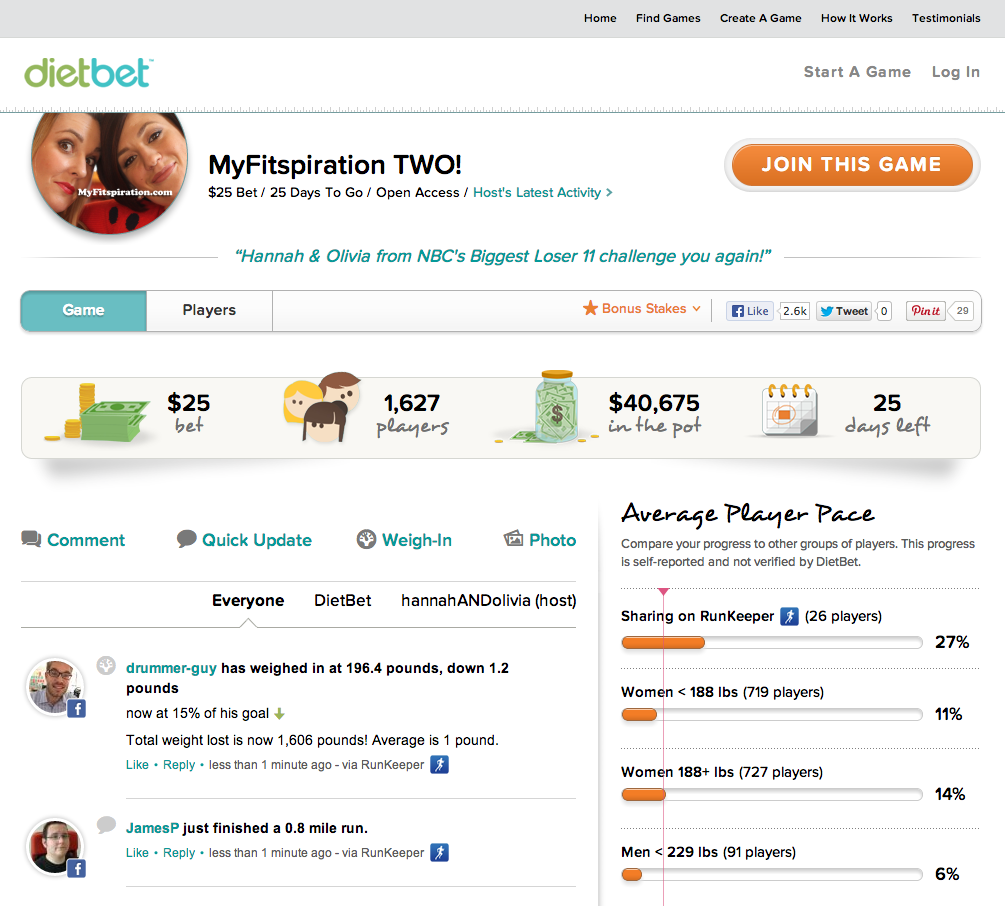
DietBet (@dietbet) enables runners and other RunKeeper (@runkeeper) users to lose weight socially by challenging their friends to a fun weight loss competition. Below we discuss how DietBet uses the Health Graph API & platform (@healthgraphapi) to help motivate people and keep their weight loss journeys fun.
Bill Day: Please tell us about yourself and your work.

Adam McClean: I’ve been a product manager for almost eight years with a primary focus in e-commerce and consumer brands. I’m also training for a mini marathon later this year.
BD: What is the “elevator pitch” for why someone should use DietBet?
AM: DietBet is the best way to jumpstart your weight loss and access the support necessary for success. It’s a great mix of behavioral economics (loss aversion and financial incentives), community, and accountability. Players put money on the line and commit to losing 4% of their starting weight in 4 weeks. During the game players make friends, talk smack, and track their progress as they approach their goal. Everyone who reaches the 4% goal ends up splitting the pot — and making some extra money!
BD: How did you get started using the Health Graph API?
AM: I’ve been using RunKeeper and saving my personal data to the Health Graph for a long time. After I participated in my first DietBet, it was clear the two should integrate.
BD: How will the Health Graph platform benefit your business?
AM: Running and weight loss have a symbiotic relationship: Losing weight helps you improve your running time and running helps you burn calories and lose weight. Players who connect with RunKeeper will be able to send weight updates and running activities directly into their DietBet game. Also, any weight updates made on DietBet will be saved back to the player’s Health Graph account.
BD: Which portions of the Health Graph API do you use, and why?
AM: Since DietBet players are required to submit their weight in order to play the game, we wanted to allow them to do this from both DietBet and RunKeeper. We are using Weight Measurements to get/post all of the weight data. We are also grabbing running details from Fitness Activities, so other players can see the hard work being done to help a player make their 4% goal.
BD: What do you like about the Health Graph API?
AM: We love the simple approach to tracking changes using Root Resource and Change Log. This lowers the overhead on our end and lets us post activities and weight updates within minutes.
BD: If you could request any new feature from the Health Graph platform, what would it be? How would you use it?
AM: Most weight data is inputted manually using the honor code. Because we have a team of referees and a photo-based verification solution, we’d like to be able to indicate when weight entries are “verified” vs “manual” the same way you can specify a “tracked” vs “manual” fitness entry.
BD: Can you share any future plans for DietBet? What’s coming next that people will be excited about?
AM: We’re hoping to expand beyond the current game (4% in 4 weeks) and allow users to play games with longer timelines and larger weight loss goals. We also want to reward players for maintaining their weight or establishing healthy habits.
BD: Is there anything else we should know about you or DietBet?
AM: Organize a game today and use promo code HEALTHGRAPH. If you get 8+ other players into the game, we’ll refund your bet!
Cross-posted from the Health Graph blog.
I have an abiding passion for trails. I love to run them. I love to hike them. I love to study maps of them. You name it, if it’s trail related, I want to be a part of it. Thinking about this recently, it occurred to me that there must surely be other trail running fanatics in the RunKeeper user community. Et voila, a new trail running blog column was born!
This first time out, I thought it’d make sense for me to set the stage by describing my personal journey into trail running. Some of this is me repeating myself from a blog post a couple of years back, but for the sake of completeness, here goes…
It started for me in 2009. I had decided to join some family on a Colorado hunting and hiking trip in the early fall. As part of getting ready for that trip, I took a hard look at my fitness. I didn’t like what I saw.
I was fifty pounds overweight. I knew I needed to make some changes to both my diet and my level of physical activity. For diet, that led to colorful veggies and Greek yogurt, along with fewer desserts and seconds. For exercise, I settled on running.
Prior to this, I’d always hated running. Well, distance running, anyway. I loved baseball, but that only involved short sprints. And I’d had a long term on-again, off-again love affair with cycling, but never far or fast enough to give me any serious aches and pains. For me, running was the punishment given out by other sports.
But then I came across a plan from a gentleman named Cameron Hanes (Cam on Facebook) which helped me ease into running thirty minutes at a time, three or four times per week. Cam outlined walking ten minutes, running five, then repeating both each outing for the first two weeks. Then his plan built up gradually over eight weeks to one hour per run, most of it running instead of walking.
Having a plan with specific, measurable “baby steps” made fitness achievable for me. I followed the Hanes plan, ran my first 5k race, and actually enjoyed it. I ran another, and shaved off a pretty good chunk of time. Then I went on the Colorado trip and found myself much fitter and happier hiking at altitude than I’d ever been before. I felt the benefits of the last couple of months of running. That’s when I made the decision to train for a 10k trail race, and from that came several half and full marathons along with all the trail time I can squeeze in.

Trail running has helped me to lose and keep the fifty pounds off. Now I can’t imagine going more than a day or two without running. I’m always on the lookout for 25k trail races (my current favorite distance). And I want to share my passion for fitness and especially trail running with everyone I can!
In future installments, I’d like to focus upon trail topics dear to me including trail running resources, racing, upping mileage over time, and ever lighter shoes. Please let me know what you’d like me to cover, too, in the comments below. Thanks, and see you on the trails!
Cross-posted from the RunKeeper blog.
One question we receive fairly often from Health Graph (@healthgraphapi) partners is how to validate that fitness activities (runs, walks, bike rides, etc.) read out of the Health Graph platform were GPS-tracked versus manually entered by the user. Rewards partners a la Earndit and GymPact, corporate wellness providers like Virgin HealthMiles, and forward-thinking brands are often keen to differentiate between tracked versus manually entered activities as part of their programs’ anti-fraud efforts.
So how do you tell the difference between GPS and manual activities?
Each item in the Fitness Activity feed has ‘source‘, ‘entry_mode‘, and ‘has_path‘ fields. These let you determine whether the activity was originally submitted as a GPS-tracked activity. For example, a RunKeeper (@runkeeper) mobile app GPS-tracked run should have values of “RunKeeper“, “API“, and “true” for the aforementioned fields, respectively.
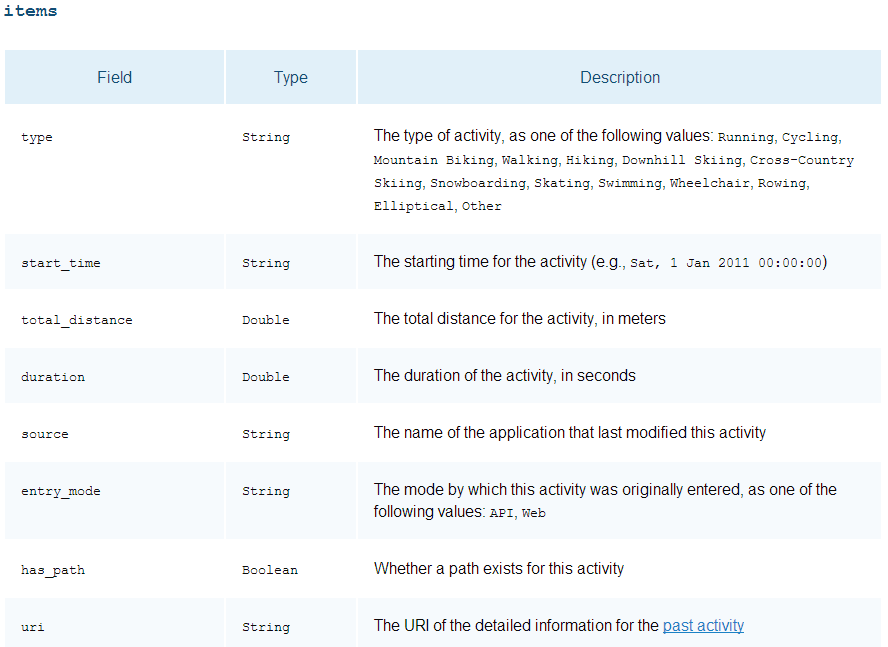
If you are interested in including GPS-tracked sources from other Health Graph partners’ activity trackers, you can include them in your ‘source‘ filtering. In addition, if you need to differentiate by type of activity (i.e. running, walking, cycling, etc.) you can use the ‘type‘ field.
Using these fields should let you skip any activities for which the user simply entered statistics, or originally entered the route map (path) via the Web. For more details on these fields and their usage, please refer to the Health Graph fitness activities documentation, especially the array structures section.
Caveat: The only reliable way to verify whether a user has subsequently edited the map associated with a saved GPS-tracked activity is to manually check each point’s ‘type‘ (a value of “manual” means it has been edited). For efficiency’s sake, we don’t save that information anywhere else in the Health Graph platform and we retrieve points only when full data for the activity is requested. That said, we have found that most users do not edit maps after the fact.
Cross-posted from the Health Graph blog.
The GEAR4 Renew SleepClock is a non-contact (no headbands or wristbands) sleep monitor for RunKeeper (@runkeeper) users. Read on to learn how GEAR4 uses the Health Graph API & platform (@healthgraphapi) to add sleep into your health and wellness profile.
Bill Day: Please tell us about yourself and your work.
Shane Dodson: I joined GEAR4 five years ago and have been developing consumer electronics accessories during my time here, mostly docking stations and Bluetooth products. We started to make our products app-enabled around 3 years ago. This also meant we could look beyond the audio products which made up our core range.
I enjoy long distance running and so getting the chance to work with products that measure my health and fitness has been really exciting. I am currently training for my first ultra marathon. Looking at my sleep and running stats helps me to analyse the progress of my training program and also keeps me motivated by sharing the data with some of my training partners. I am trying to observe patterns – for example when I have had periods of very heavy training, do I sleep longer or deeper?
BD: What is the “elevator pitch” for why someone should use Renew SleepClock?
SD: The Renew SleepClock is a wireless sleep monitor that allows you to track, learn, and improve a third of your life you know little about!
Renew uses a sophisticated bio-sensor to wirelessly monitor your sleep. It knows when you’re awake and it knows when you’re asleep. It even knows whether you’re in light or deep sleep. It senses your breathing and movement and wakes you up at the best moment in your sleep cycle so you start the day feeling refreshed and energized. The Renew App lets you track your sleeping patterns from graphs and charts and gives you analysis and recommendations based on your data to help you get the most out of your sleeping life.

BD: How did you get started using the Health Graph API?
SD: When we launched the Renew SleepClock we knew that we had to engage the user, not just to measure their sleep, but to improve their habits so that they could sleep better leading to a healthier life. We knew that we had to look beyond sleep itself and started to look at potential key partnerships. RunKeeper was the obvious choice and that led us to Health Graph platform.
BD: How is using the Health Graph platform benefiting your business?
SD: SleepClock Renew can measure all sorts of details about sleep patterns, influencing factors, and suggestions on how to improve sleep. However we realised that sleep is only one of three important parts of a healthy lifestyle; sleep, diet and exercise. Health Graph platform allows the user to have this more holistic view of their wellness which is essential.
BD: Which portions of the Health Graph API do you use, and why?
SD: We push Sleep Sets to the Health Graph giving you a more complete health picture. The Renew SleepClock measures these details.
BD: What do you like about the Health Graph? What would you like to see changed?
SD: It has very good documentation. We had a request to allow group uploads of sleep data (previously it was only possible to upload a single night’s date). The API has now been changed to enable this.
We post summary statistics. It would be useful to push the underlying raw data. This would allow more interesting graphs about sleep within RunKeeper.
BD: If you could request any new feature from the Health Graph, what would it be? How would you use it?
SD: We sync sleep data with our own cloud-based storage. It would be interesting to look at ways that our cloud could sync directly through the Health Graph platform. This would enable our users and RunKeeper users to have a seamless experience and have even more insight into their sleep patterns.
BD: Can you share any future plans for Renew and Gear4? What’s coming next that customers will be excited about?
SD: We are looking at a second version of the Renew SleepClock which would make this more accessible to a wider user base. We would definitely intend to continue using Health Graph platform for that.
We are also looking at other related products – more on that later this year.
BD: Is there anything else we should know about you, Renew, or Gear4?
SD: At GEAR4, we believe that personal wellness should be accessible to everyone. To that end we created the Renew brand. Leveraging our experience in smartphone accessories we are creating a line of products that help people track, learn and improve their personal well being. The Renew SleepClock is just the beginning. In the coming months and years we are looking to stand out with products that incorporate the latest technology while being affordable and simple.
Cross-posted from the Health Graph blog.

 BillDay.com